Missing Google Reviews? Here’s how to fix the issue!

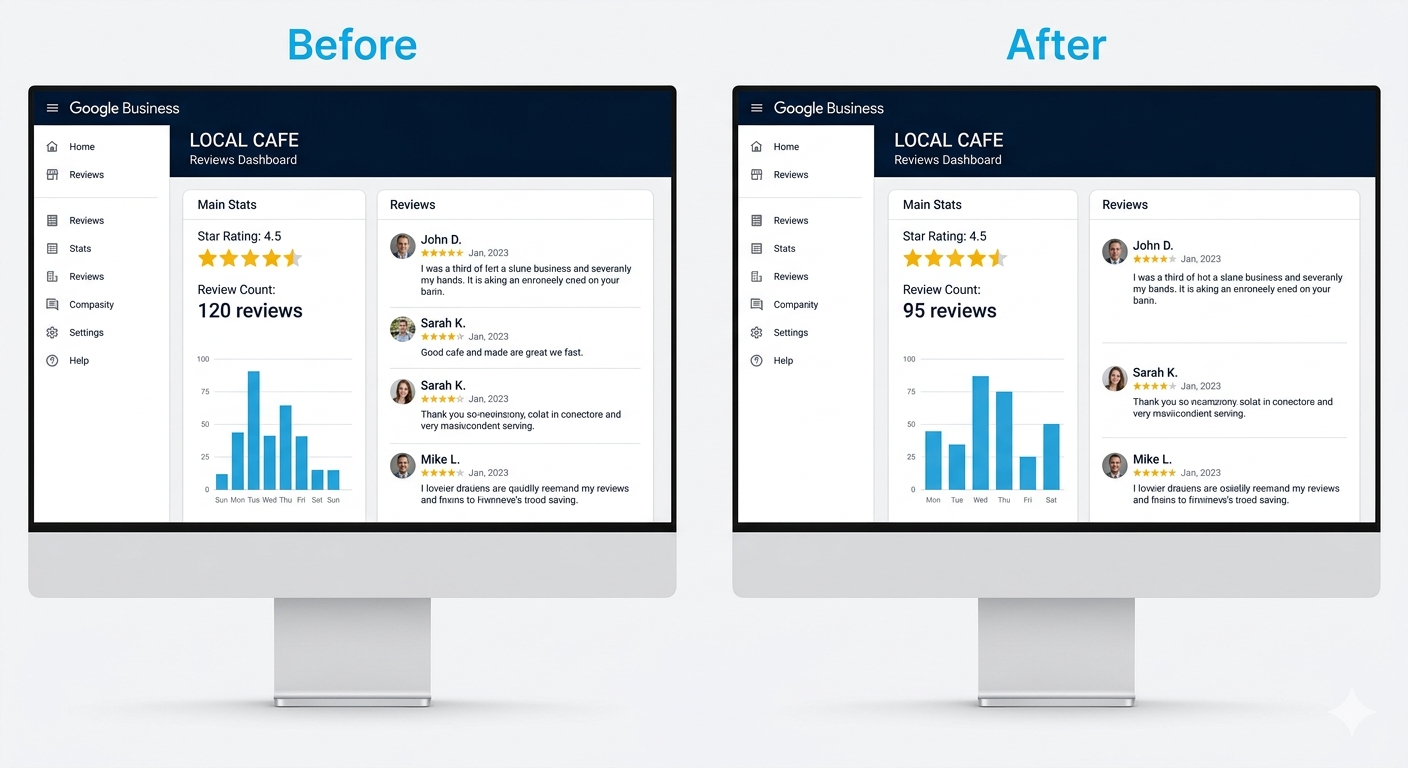
You log into your Google Business Profile, and the review count is wrong. Reviews you know existed (the ones you remember reading, maybe even responded to) are gone. No email from Google. No explanation. Reviews are important points of reference, so it’s understandably distressing when something goes wrong.
And for a local business where those reviews directly influence who finds you and whether they call, it’s a business problem.
The good news is that not all missing Google reviews are permanently lost. Some are filtered and may return on their own. Some got caught in Google’s increasingly aggressive spam sweeps, which in 2025 and 2026 have taken legitimate reviews down alongside fake ones. And some are deleted for good.
Knowing which situation you’re in determines what you do next.
TL;DR
- Missing reviews are often filtered, not deleted.
- Check first before taking action.
- Submit one well-documented support request if truly removed.
- Avoid actions that trigger further filtering.
Why Google Reviews Go Missing
Missing Google reviews have several distinct causes, and the reasons have multiplied recently as Google’s moderation systems have become dramatically more aggressive.
- Google’s automated spam filter: The most common cause. Google’s AI evaluates reviews against spam signals such as brief 5-star reviews, velocity spikes, and thin reviewer accounts. Legitimate reviews get flagged regularly. In 2024, Google removed over 240 million reviews (a 40% increase from the prior year). Data from 50,000 deleted reviews shows 5-star reviews make up 73–89% of all removals because brief positive reviews match spam signatures.
- Policy violations: Reviews with prohibited content (offensive language, irrelevant content, personal information) are removed permanently and aren’t recoverable.
- Reviewer account issues: If the reviewer deletes their Google account or Google flags it as fake, their reviews go with it.
- Profile changes and merges: Merging duplicate listings or reinstating a suspended profile can temporarily displace reviews.
- Temporary delays: New reviews can take a few days to index. What looks missing might just be pending.
The 2025–2026 mass removal sweeps:
Google integrated Gemini AI into review moderation in 2025, and deletion rates surged over 600% between January and July 2025. A second wave hit around October 2025 and extended into early 2026. In February 2026, a global incident caused hundreds of millions of reviews to disappear (many legitimate). As of mid-March 2026, Google had restored most, but not all, of the affected reviews. If your reviews dropped suddenly in this window, you likely didn’t do anything wrong.
Filtered vs Deleted: What’s the Difference and Why It Matters
This is the most important diagnostic question, and most guides don’t explain it clearly enough.
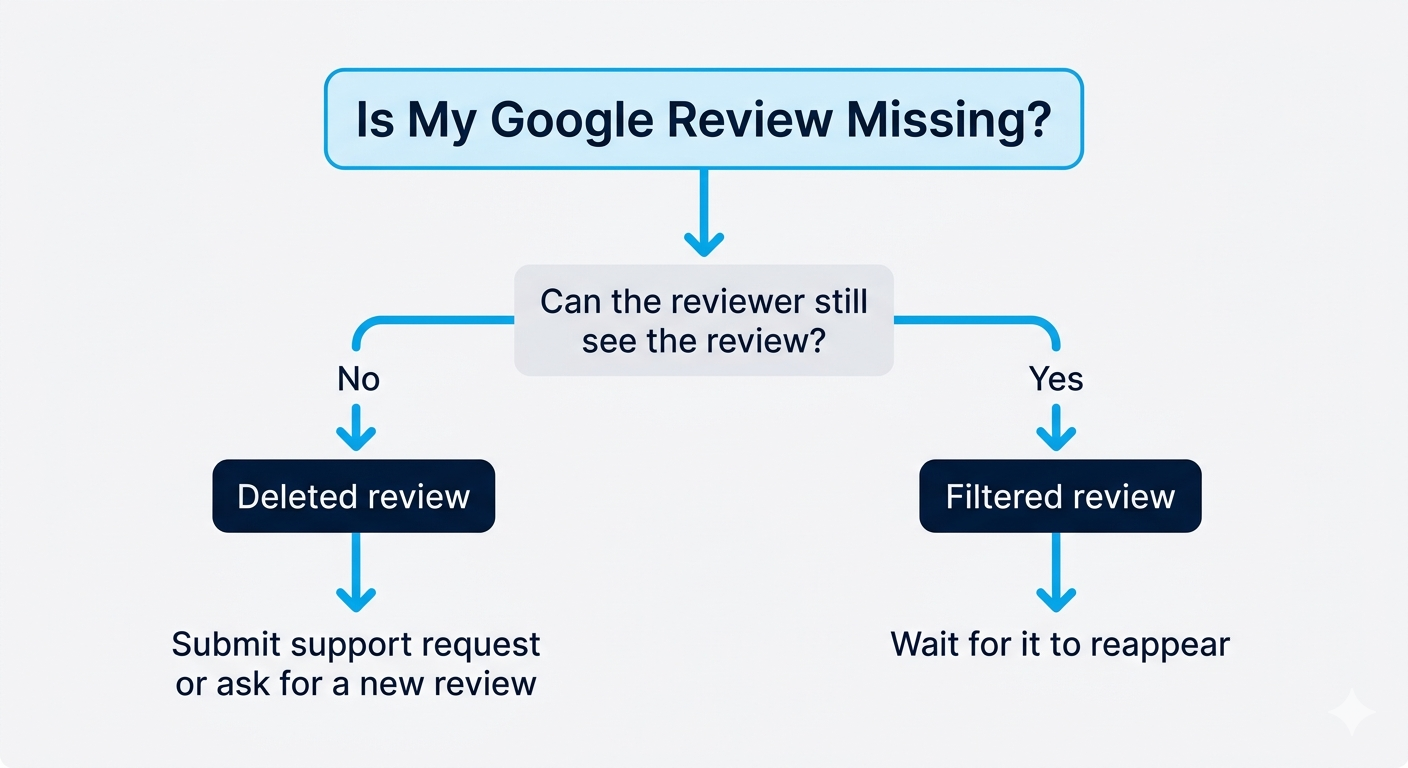
A filtered review is temporarily held by Google’s spam system. The reviewer can still see it from their Google account. It’s just not visible on your public profile. It may reappear on its own within days to weeks.
A deleted review is permanently gone. Neither party can see it anywhere.
How to tell which you’re dealing with: Ask the reviewer to check their Google Maps contribution history. If they can see it, but it’s not on your profile, it’s filtered. If neither side can find it, it’s deleted.
This determines your next move. A filtered review may come back. Pushing hard (filing tickets, asking for an immediate repost) can work against you. A deleted review is permanent, and the path is different.
How to Request Review Reinstatement
If you’ve confirmed a review is missing (not just delayed) and you believe it was a legitimate, policy-compliant review, here’s the correct process:
- Step 1: Verify it’s actually missing: Check your profile in an incognito browser and on a different device before assuming the worst.
- Step 2: Gather evidence first: Reviewer’s full name, approximate post date, review text (ask them to screenshot it from their account), and your GBP profile link. This is what makes a reinstatement request credible.
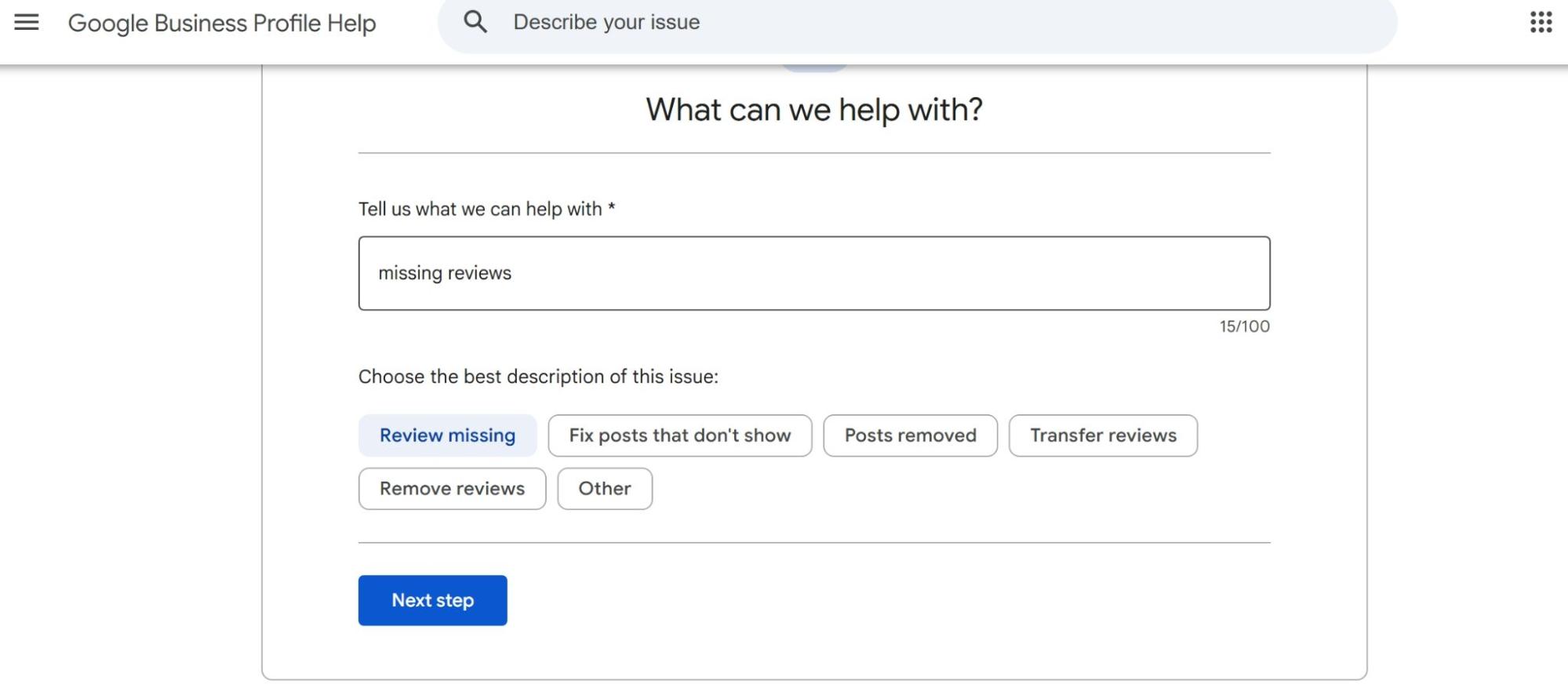
- Step 3: Submit through GBP support: Go to your GBP dashboard > Help > Contact support about a missing review. Keep it factual: “A verified customer review posted on [date] by [name] appears to have been removed. The reviewer confirms it complies with Google’s policies. Screenshot attached.”
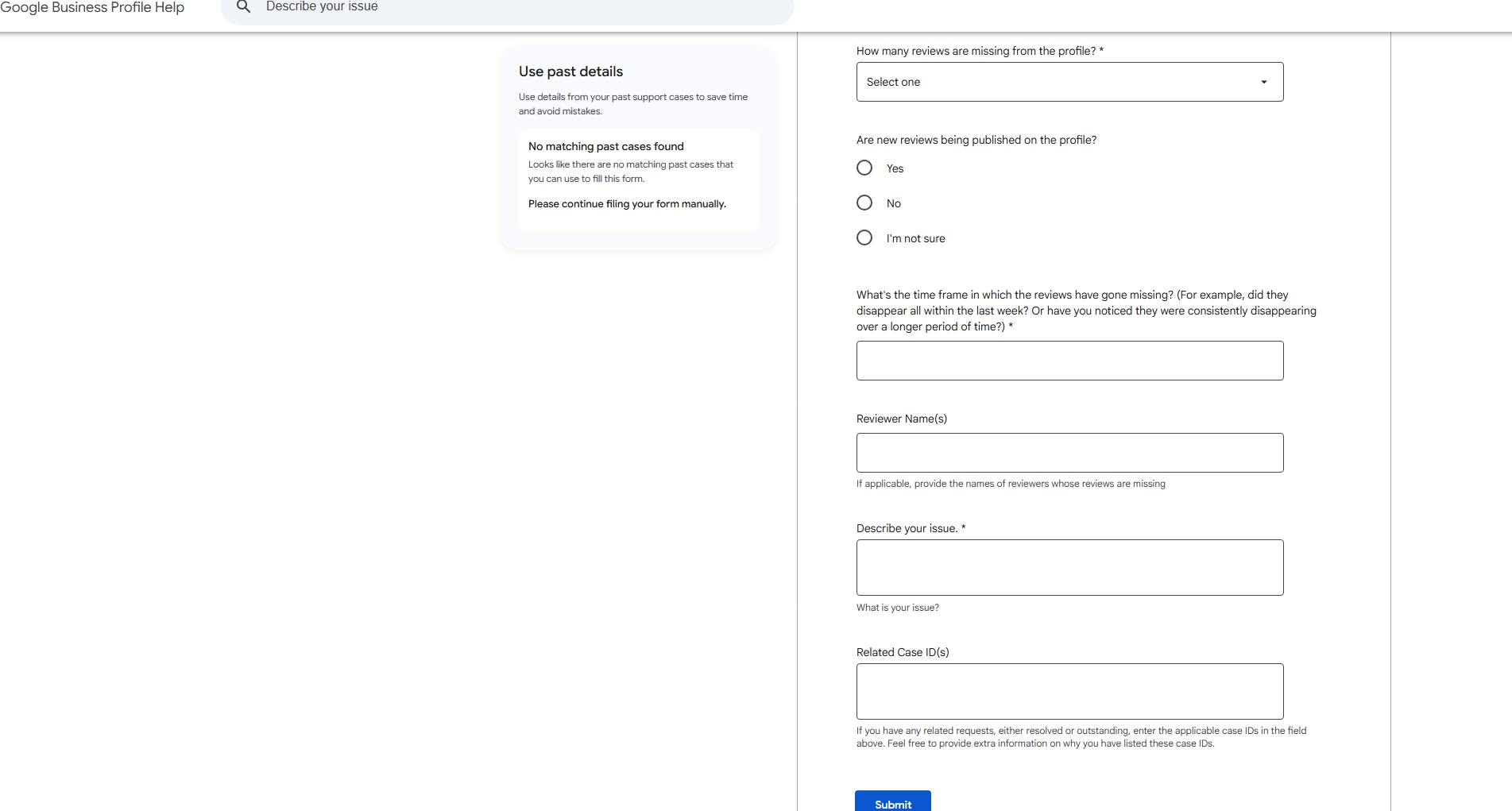
- Step 4: Submit once, then wait: Reinstatement reviews take days to weeks. Multiple tickets slow the process and can flag your account for additional scrutiny.
- Step 5: If unsuccessful: Ask the reviewer to write a new review in fresh wording. Don’t ask them to repost the same text. An identical copy re-triggers the filter that removed it the first time.
What NOT to Do When Reviews Go Missing
A few common reactions make the situation worse:
- Don’t repost the same review text. It re-triggers the spam filter.
- Don’t ask employees or contacts to compensate with new reviews. Google detects this pattern and may suppress further.
- Don’t file multiple support tickets. One well-documented request outperforms five duplicates.
- Don’t offer review incentives in response. It’s a separate policy violation that compounds your risk.
How to Protect Your Reviews Going Forward
Prevention is more reliable than recovery, especially as Google’s enforcement continues to intensify.
- Screenshot every new review immediately: 10 seconds now creates the evidence you’ll need later.
- Build velocity steadily, not in spikes: 2-3 reviews per week looks healthy to Google’s systems. 20 reviews in 48 hours (even if all genuine) look coordinated.
- Monitor your count regularly: The businesses blindsided by missing reviews are the ones who don’t notice until weeks after the drop. Automated tools like Synup’s reputation monitoring alert you within 24 hours of a change, so you can act before the damage compounds.
Read further in our online review management guide to build a review strategy resilient enough to withstand future sweeps.
- Keep your practices clearly compliant: Profiles with suspicious positive-to-negative ratios are the most vulnerable in mass removal events. If you’re unsure where your current approach stands, check out our guides on how to spot fake reviews on your profile and how to handle negative Google reviews.
The Bottom Line
Most missing Google reviews are recoverable if you move correctly and quickly. Determine whether reviews are filtered vs. deleted before acting. Gather documentation before contacting support. Submit one request and wait. Don’t let frustration push you into responses that make it worse.
For the long term, steady review velocity and clean practices are the most reliable protection. Audit your online reputation to see where your profile stands right now and build a long-term online review management strategy.
FAQs
- Why did my Google reviews disappear?
Google reviews usually disappear due to spam filtering, policy violations, or review spikes.
- Are missing Google reviews gone forever?
Not always. Filtered reviews can return. Deleted reviews are permanently removed.
- Can I recover deleted Google reviews?
You can submit a support request if the review was policy-compliant.