Why Your Local Listings Aren’t Showing Up on Search: How to Fix It
A common problem in local businesses is something we like to call “local listing invisibility”, where your business technically exists online, but fails to appear when customers search for the services you provide.
Even when you’ve set up your Google Business Profile (GBP), filled out every field, added photos, and verified your address, visibility can still break down unless there is a strong and cohesive local search foundation behind it. The following elements commonly influence whether your business shows up in search:
- Verification status
- NAP (Name, Address, Phone Number) consistency
- Business categories
- Reviews
- Website signals
If your visibility has dropped, there’s a specific breakdown behind it. And the first thing to do is diagnose it. This blog post will go through the eight most common culprits and exactly how to resolve each one.
TL;DR
- Local visibility drops when key signals fall out of alignment in Google local search.
- The most common issues are verification, inconsistent business data, weak reviews, incorrect categories, and missing website location signals.
- Fixing these areas and keeping them consistent typically restores rankings within a few weeks.
How Does Local Search Actually Work?
Before diving into solutions, you need to understand what you’re optimizing for.
What Are Local Listings?
Local listings are your business’s digital storefront across platforms: Google Business Profile (the dominant player), Bing Places, Apple Maps, Yelp, and industry-specific directories. Each platform uses your business information (name, address, phone, categories, reviews) to determine when and where to show you.
The Local Pack vs. Organic Results:
When someone searches “plumber near me,” Google displays the local 3-pack (map with three businesses) above organic website results.
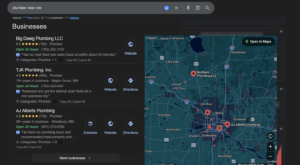
Research shows that businesses ranking in the top three local pack positions get 126% more traffic. If you’re not in the pack, you’re functionally invisible.
How Google Determines Visibility:
Google’s local algorithm weighs three primary factors:
- Relevance: Does your listing match what the user searched for?
- Distance: How close are you to the searcher’s location?
- Prominence: How well-known and trusted is your business? (Reviews, links, citations)
Simply having a GBP doesn’t guarantee a good online presence. You need verification, optimization, consistency across the web, and positive reputation signals. Miss any of these, and you’re out of contention.
Also Read: The Impact of Inaccurate Local Listings on Businesses
The 8 Most Common Reasons Your Listings Aren’t Showing Up
Problem #1: Your Google Business Profile Isn’t Verified (or Is Suspended)
Unverified profiles have limited visibility and lack access to critical features like posting updates, responding to reviews, and appearing in high-intent searches.
How to check your status:
- Log in to your GBP dashboard and use this tool.
- Follow the prompts and see your verification status.
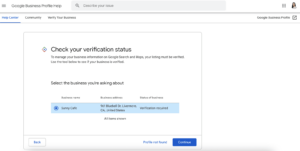
Image courtesy of SE Ranking
Common reasons for suspension:
- Fake addresses (P.O. boxes, UPS stores, virtual offices for storefront businesses)
- Keyword stuffing in a business name
- Multiple listings for the same business
- Guideline violations (inappropriate content, misleading information)
How to fix it:
For unverified profiles:
- Request verification via postcard, phone, email, or video (depending on what Google offers)
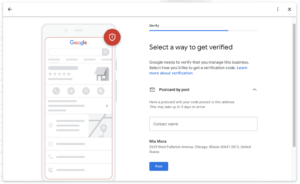
Image courtesy of SE Ranking
- If verifying via email, complete verification within 30 days of receiving the code, or you’ll need to restart the process.
- After completing all the steps, wait up to 5 days to get verified.
For more details, see this guide.
For suspended profiles:
- Review Google’s Business Profile Guidelines first.
- Fix violations (remove keyword stuffing, use a legitimate address, delete duplicates).
- Submit reinstatement request here.
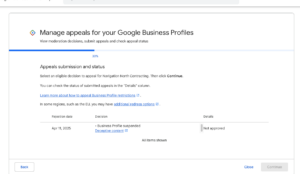
Image courtesy of Google
Problem #2: NAP Inconsistencies Across the Web
What NAP means: Name, Address, Phone Number – the three data points Google uses to confirm your business identity across the internet.
Google validates your business by checking across hundreds of sources. If your NAP varies across the web, search engines begin to hesitate. When the algorithm is unsure, it shows neither.
Common inconsistency issues include switching between “Street” and “St.”, using different phone numbers (main line vs. tracking numbers), or alternating between your legal business name and your DBA (Doing Business As). Individually, these seem minor. Collectively, they weaken trust signals.
To audit your NAP, you can manually search your business name plus city and check listings across major platforms like Google, Facebook, Yelp, Apple Maps, and Bing Places. Note every variation you find and standardize everything to one exact format.
If you want speed and scale, tools like Synup can scan 100+ directories and show inconsistencies in one dashboard, allowing bulk updates.
This also impacts your AI visibility in Google’s AI overview and other AI tools. AI platforms get data from directories & other structured sources where NAP becomes quite important.
Problem #3: Wrong or Missing Business Categories
Categories on your GBP tell Google when to show your business. A common mistake in selecting categories is being too broad. Selecting “Contractor” instead of “Roofing Contractor” limits your relevance for roofing-specific searches.
Another frequent error is using service phrases instead of official Google categories. “Emergency Plumbing Services” sounds right, but the correct category is simply “Plumber.”
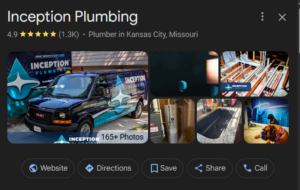
Your primary category carries the most weight. It defines your core service. Secondary categories (up to 9) expand your visibility into related services, but they don’t override the primary one.
To be sure about what categories to select, you can research competitor categories by searching your main keyword plus the city. Then, click the top local results, and review the categories listed on their GBP.
Best practices:
- Choose the specific category that describes your core service.
- Add secondary categories for actual services you provide (don’t spam irrelevant ones).
- Check Google’s official business categories list for exact naming.
Problem #4: Your Service Area Isn’t Properly Configured
There are two types of businesses in local search:
- Storefront businesses: customers visit you.
- Service-area businesses: you visit customers.
Google needs to understand whether customers come to you or you go to them. If you hide your address when customers come to you, you weaken your geographic authority. If you claim an entire state as your service area, you dilute your local relevance.
Inside your GBP settings, storefront businesses should display their address and usually leave service areas blank. Service-area businesses should hide the address and add specific cities or zip codes within a realistic radius, typically 25 to 30 miles.
The key is alignment between how you operate in real life and how your listing is configured. Don’t overextend, as Google penalizes businesses claiming unrealistically large service areas.
Problem #5: Lack of Reviews or Poor Review Signals
Reviews are among the strongest local ranking signals. A profile with zero reviews signals risk (possibly fake). A profile with only a few outdated reviews signals inactivity (maybe closed). Neither builds confidence (for Google or customers).
Businesses in the top 3 local pack positions average 50-100+ reviews in competitive markets. But it’s not just volume. Recency matters too. Five new reviews this month can outperform 200 reviews from five years ago.
Learn More: What is Review Recency: Does it Matter for Local SEO?
There’s also a relevance factor. When customers mention specific services, like “water heater repair,” Google associates your business with those keywords. Over time, this strengthens rankings for those services.
How to ethically generate more reviews:
- Ask customers right after a successful job.
- Make the process easy with a direct link.
- Use automation tools like Synup to streamline follow-ups.
- Never incentivize reviews. It violates Google’s guidelines and risks penalties.
Responding to reviews matters too. It signals active engagement both to customers and Google’s algorithm.
Read: 50 Google Review Reply Templates for Different Industries
Problem #6: Duplicate Listings Are Fragmenting Your Signals
Duplicate listings split your credibility. Instead of one strong profile with consolidated reviews, you create two weaker profiles competing against each other.
How duplicates occur:
- Business moved, old listing remains active
- Previous owner’s listing still exists
- Multiple employees created listings independently
- Aggregator data created auto-generated listings
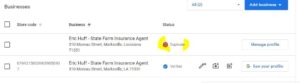
Image courtesy of Google
To identify duplicates, search for your business name and city in Google, then check the results in Google Maps.
If you control the duplicate, log into GBP, go to the extra listing, and choose “Remove” if it’s an old location or “Mark as duplicate” if it represents the same business. If you don’t control it, click “Suggest an edit,” request removal, and explain that it’s a duplicate.
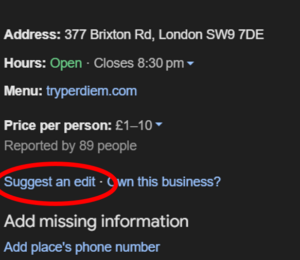
The good thing is that prevention is even simpler: never create a new listing when you move, rebrand, or change ownership. Always update the existing one.
Problem #7: Your Website Lacks Local SEO Signals
Your Business Profile doesn’t exist in isolation. Google validates it against your website. If your site lacks local signals, rankings suffer.
One major issue is missing LocalBusiness schema (structured data). It helps Google clearly understand your business NAP, hours, and service area. Without it, Google has to guess. Tools like Google’s Structured Data Markup Helper or plugins such as Schema Pro can simplify implementation.
Some other common problems include:
- Missing NAP in footer
- No location-specific content
- Missing Google Maps embed
- No local backlinks
If you operate multiple locations, each one needs its own dedicated page. That page should include unique NAP details, an embedded map, location-specific content, and schema markup tailored to that address.
Problem #8: You’re Targeting Service Areas Far from Your Physical Location
Distance is a primary ranking factor. Even a perfectly optimized business will struggle to outrank competitors physically located closer to the searcher.
That doesn’t mean expansion is impossible; it just requires a realistic strategy. Content marketing can help you build relevance in nearby cities by publishing genuinely useful, locally focused articles. Dedicated service pages for specific cities can also work if they contain unique, valuable information rather than templated spam. Building citations and backlinks within those target cities strengthens geographic signals as well.
What doesn’t work is gaming the system. Virtual offices, PO boxes, and fake addresses violate guidelines and often lead to suspension. Google’s rules are clear: only list addresses where you have a legitimate physical presence.
How to Diagnose Which Problem You Have
Follow this systematic troubleshooting process:
- Start by checking your verification status inside GBP.
- Next, search your exact business name and city in incognito mode. If not appearing, a verification or suspension issue.
- Then search your primary service plus city. If you’re not ranking within the top results, you’re likely dealing with category, review, or prominence issues.
- Test searches from different neighborhoods (use VPN). If you appear for some locations but not others, then it’s a proximity/service area configuration issue.
- Run a citation audit using tools like Synup to uncover NAP inconsistencies.
- Finally, review technical performance in Google Search Console to identify crawl errors, mobile usability problems, or schema issues.
Also Read: Top 15 White Label Local SEO Tools
Quick Wins You Can Implement Today
Some improvements don’t require weeks of work and show results fast:
- Complete every section of your GBP.
- Add high-quality photos (exterior, interior, team, services).
- Publish your first GBP update or offer post.
- Request 3–5 recent reviews from satisfied customers.
- Add accurate business hours, including holidays, and detailed service listings. Enable messaging and add FAQs.
All of these strengthen relevance and engagement.
When to Get Professional Help
DIY works up to a point. If you’re facing repeated suspensions, competing in a high-intensity market like personal injury law or cosmetic dentistry, managing multiple locations, or dealing with technical website issues, professional help often accelerates results.
Professional services typically include full citation cleanup across major directories, GBP optimization, structured review generation processes, local link building, schema implementation, and ongoing competitive reporting.
When evaluating providers, ask about their citation correction process, review compliance strategy, reporting structure, and case studies. Avoid anyone guaranteeing #1 rankings, promising “special relationships” with Google, or offering fake reviews.
Local SEO is strategic work. The right expertise compounds results. The wrong shortcuts create penalties.
Conclusion
If you let the disconnected signals persist, they won’t combine into a strong online presence in search. Instead, they dilute your authority, fragment your credibility, and weaken your chances of appearing in the local pack.
The net result is poor visibility.
Align your verification, your data, and your reputation signals so search engines see a consistent, trustworthy picture of your business. That alignment helps your business show up in local search without resistance.
With Synup, you can keep your business information accurate across directories, manage and monitor reviews in one place, and track performance from a unified dashboard. Book a demo to know more.
Also Read: Top 8 White Label Local Listing Management Software
FAQs
- Can I rank in multiple cities with one location?
Yes, but only within a realistic radius. Strong localized content and citations help expand visibility.
- Why do I appear in Google Maps but not in search results?
Maps relies more on proximity; search rankings also depend heavily on website authority and content.