



You didn’t start your agency because you had an undying passion for data entry and chasing after $500 checks. You started it to build a business that (hopefully) grows to scale. If you are still manually billing twenty companies, from HVAC to dental practices every month, you are burning your most valuable assets: time and money in unnecessary billable hours.
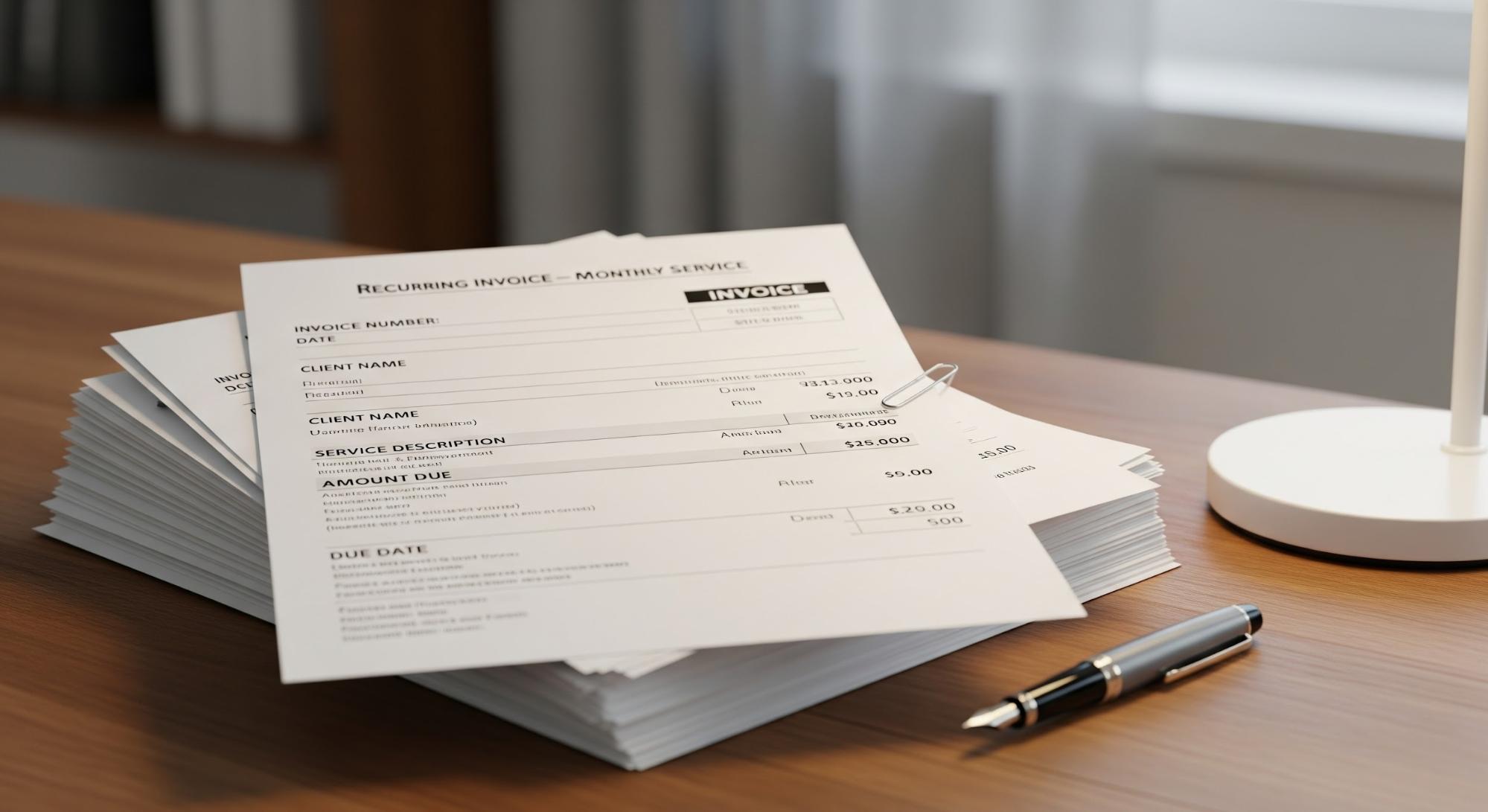
Recurring invoices are automatically created and sent to customers at predefined intervals (weekly, monthly, or quarterly) without requiring manual intervention each billing cycle. Once set up, they remain running in the background.
This guide shows you all you need to know about recurring invoices, from practical examples to the technical steps to sending recurring invoice sets using Synup. Let us help you simplify what often feels like the most tangled web of agency operations.
TL;DR
- Recurring invoices eliminate manual billing and stabilize monthly cash flow for agencies managing multiple clients or locations.
- Automated billing turns payments into a predictable system instead of a monthly chase.
- Recurring invoices and recurring payments are not the same; one requires client action, the other runs on autopilot.
- Agencies with retainers, per-location pricing, or long-term contracts benefit the most from recurring billing setups.
- Automation saves real operational costs by cutting admin hours, billing errors, and follow-ups.
- Consistent billing improves client trust and reduces friction with their internal accounting teams.
- Synup allows agencies to consolidate multi-location billing into a single, readable invoice.
- Clear billing rules, payment terms, and transparency prevent disputes and chargebacks later.
- Automating with Synup ensures payments arrive on a set schedule, preventing cash gaps and providing reliable financial forecasting.
Why Recurring Invoices are Essential for Agency Growth
When you handle local businesses on a per-location model, the sheer volume of paperwork can swallow your account managers whole.
Switching to an automated system is about convenience and survival in a low-margin, high-volume environment.
1. Improves Cash Flow & Predictability
Cash flow is obviously the oxygen of any service business. When you rely on manual billing, you are at the mercy of your own internal delays and your client’s memory.
By automating the process, payments are scheduled to hit your account at the same time every month. Here’s a scenario to look at:
Imagine it is Friday, and you have $25,000 in payroll due. You have $60,000 in outstanding manual invoices, but only $10,000 in the bank.
You have to spend all day following up instead of growing the business.
| The Automated Reality: With a recurring invoice system, that $60,000 is triggered on the 1st. By the 5th, 90% of it is cleared. |
Another thing is the psychological side of money. When a client sees the same charge every month, it becomes a line item, not a decision. If you send a manual bill every time, you are essentially asking the client to re-evaluate your value every 30 days. That is a dangerous game to play.
By consolidating your tech into one operating system, you can see exactly which payments are pending alongside your project performance.
This makes financial forecasting actually reliable. According to a study by Jessie Hagen at U.S. Bank, Poor cash flow management is a leading factor behind the failure of more than 82% of failed businesses. For an agency, that usually means a gap between paying your staff and receiving client retainers. Automated billing bridges that gap.
2. Saves Time and Reduces Admin Work
Think about the hours your team spends generating 100 different invoices for 20 different locations. Even if it takes five minutes per invoice, that is nearly a full workday gone every month just on billing.
In addition, you have the reconciliation headache of matching a random bank transfer to a specific client.
- Manual Reality: You spend 8 hours a month on billing, costing you roughly $400 in internal labor (at $50/hr).
- Automated Reality: You spend 10 minutes auditing the success report.
Besides saving money, you are saving your team’s morale. No senior strategist wants to spend their Monday morning double-checking zip codes on a PDF.
3. Enhances Customer Experience
Local business owners are busy. They are running shops, managing the crews, and dealing with their own customers. They do not want to be watching out for a PayPal link or a PDF attachment every thirty days.
Consistent, professional billing creates a sense of stability. Along with that, it helps their own bookkeeping. When the invoice arrives at the same time every month with the same clear line items, their accountant stays happy too.
4. Minimizes Errors
Manual entry is the chief cause of human error. A misplaced decimal point or a forgotten tax rate can lead to awkward conversations with clients. Not just that, but it makes you look like an amateur.
Example: You accidentally bill a client for 12 locations instead of 11. They catch it and feel intentionally over-billed. Now, your account manager has to spend an hour smoothing things over.
Since the details are set once in a recurring model, the risk of these errors vanishes in subsequent cycles. You set the price, the service description, and the schedule. The software handles the rest.
Recurring Invoices vs. Recurring Payments: What’s the Difference?
There is a common misconception in the agency world that these two terms are the same. They are related, but the distinction matters for your workflow and your tech stack.
The Recurring Invoice
This is the automated bill. The document is generated by your system and sent to the client’s inbox. However, the client still has to take action. They receive the email, open it, click a link, and choose how to pay.
- Example: You manage a local PPC campaign for a roofing company. Your management fee is 15% of the spend. Since the spend changes monthly ($3,200 one month, $4,500 the next), you send a recurring invoice so they can see the math before they pay.
- When to use it: This is incredibly useful when your totals might vary slightly month to month. For instance, if you are managing a local PPC campaign and your management fee is a percentage of spend, you might want to send an invoice so the client can review the breakdown before authorizing the charge.
The Recurring Payment (Auto-Pay)
In this scenario, the invoice is generated, and the payment is automatically charged to the default method on the scheduled date. No client intervention is required here.
- Example: You charge a flat $150 per location for Local Listings and review management. There is no reason for the client to “approve” this every month. It should just happen.
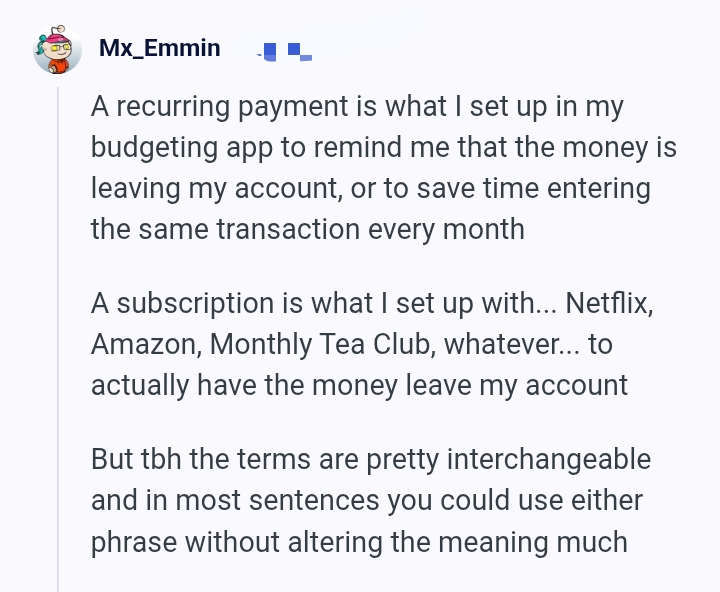
One agency owner explained the differences this way:
Source: Reddit
Recurring payment is what they set up in a budgeting app to remind them that money is leaving, while a subscription or auto-pay is what actually makes the money leave.
Pro Tip: Clients often use the terms interchangeably, so you need to clarify expectations during onboarding.
Step-by-Step Guide: How to Set Up Recurring Invoices for Your Agency
Here is how to build your billing engine using the high-performance Invoicing feature in Synup.
Step 1: Choose the Right Software
Don’t just use the cheapest invoicing tool you find. Find a tool that can bundle invoicing with several other operational features.
If you have a client like “Joe’s Pizza” and Joe has 4 locations, a dumb billing tool will make you write 4 different invoices. That is NOT what you’re looking for.
You need a tool where you can list all 4 shops on one bill, clear as day, so Joe doesn’t call you confused.
Step 2: Set the Rules of the Game
Before you go the “auto” way, tell your clients about it and what it will entail. Put it in your contract: “We bill on the 1st, you’re late by the 5th.”
If you bill a client $1,000 and they’re late, hit them with a 5% fee ($50). Don’t feel bad about it. That $50 pays for the 20 minutes your assistant spent calling them and the three emails they had to send to check in. It’s not a punishment but a “stop wasting our time” tax.
Step 3: Start a New Draft
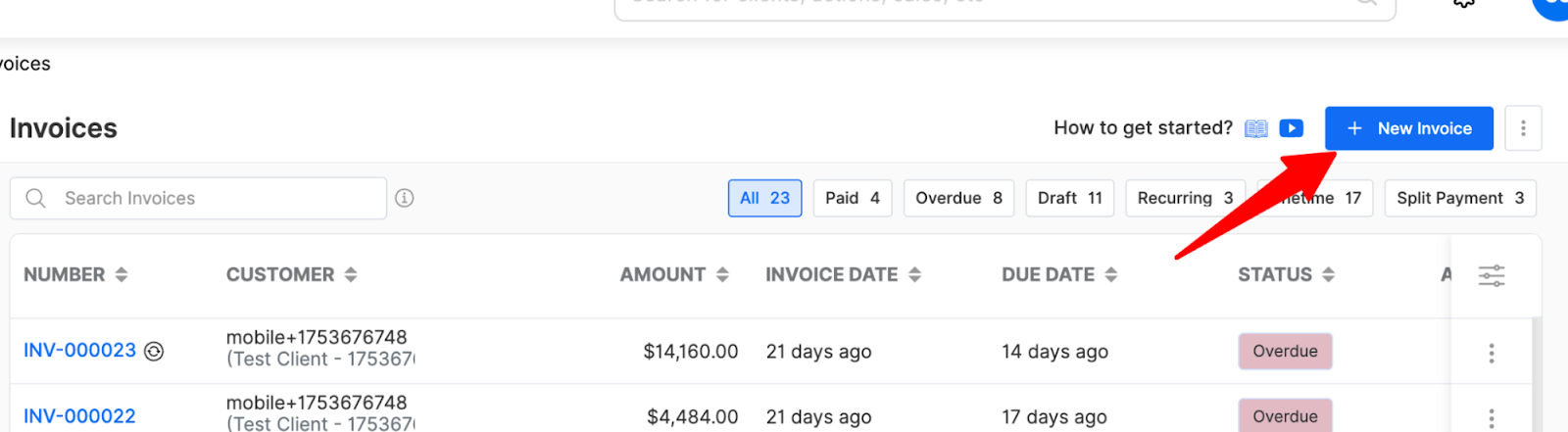
Now, jump into your Synup OS dashboard and head over to the Invoices module. Hit that + New Invoice button.
Source: Synup
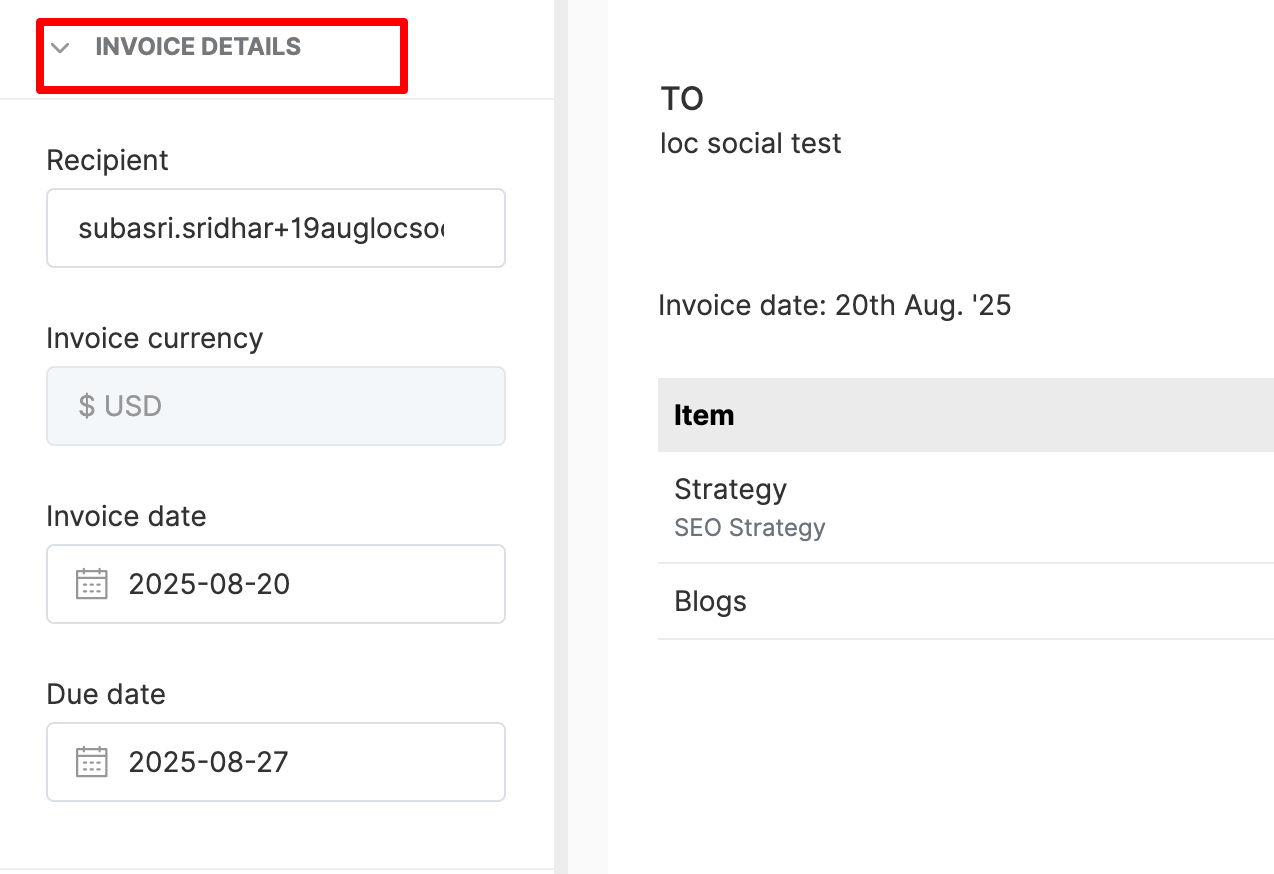
Now, you gotta add in the recipient, currency, invoice date, and due date.
Heads-up: Add your clients to your OS workspace. Type in their name, say, “Joe’s Pizza,” and hit “Continue.” This will auto-fill the fields (you can still edit!). This lands you in the editor.
Step 4: Dial In the Details (and Your Branding)
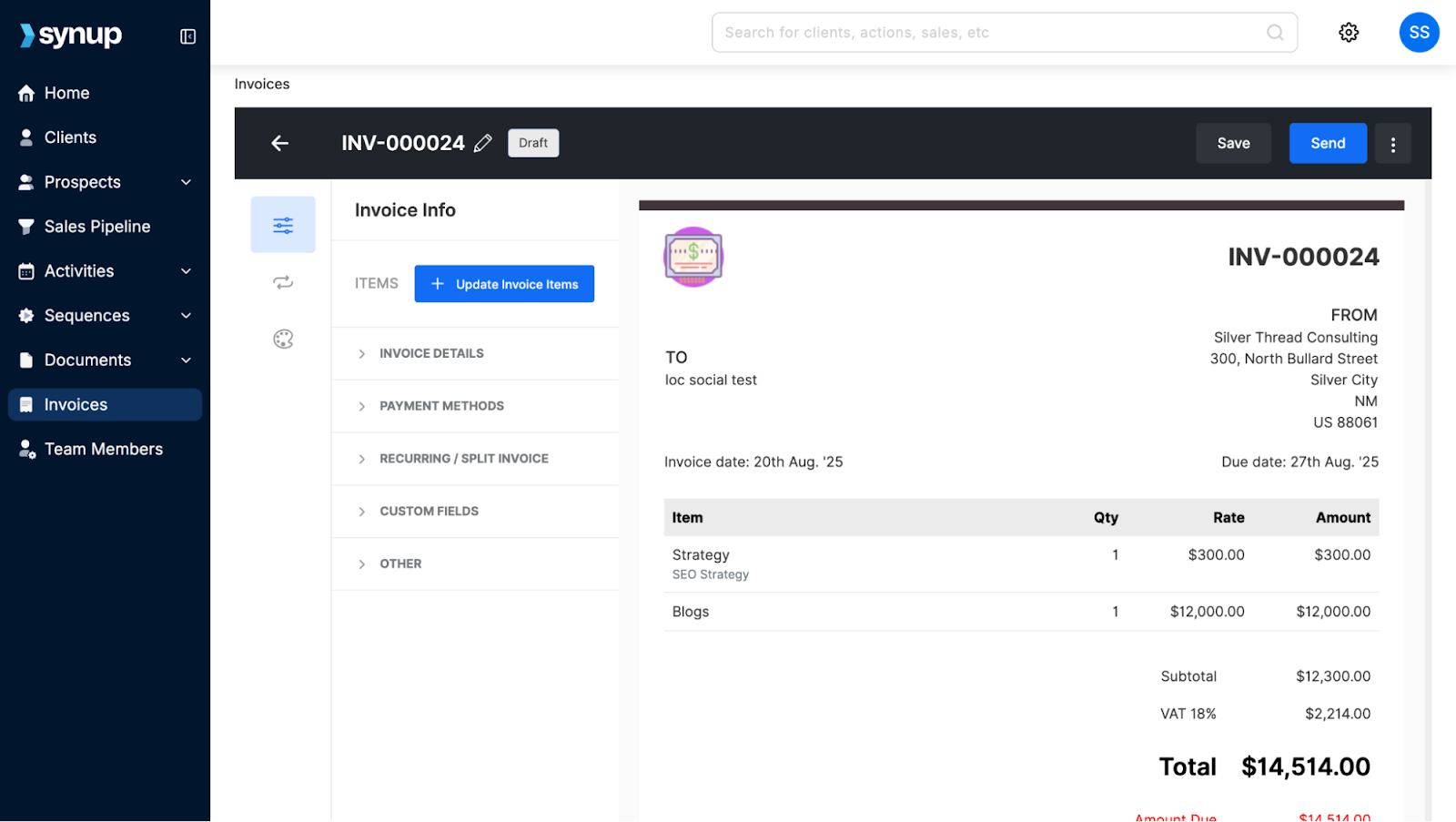
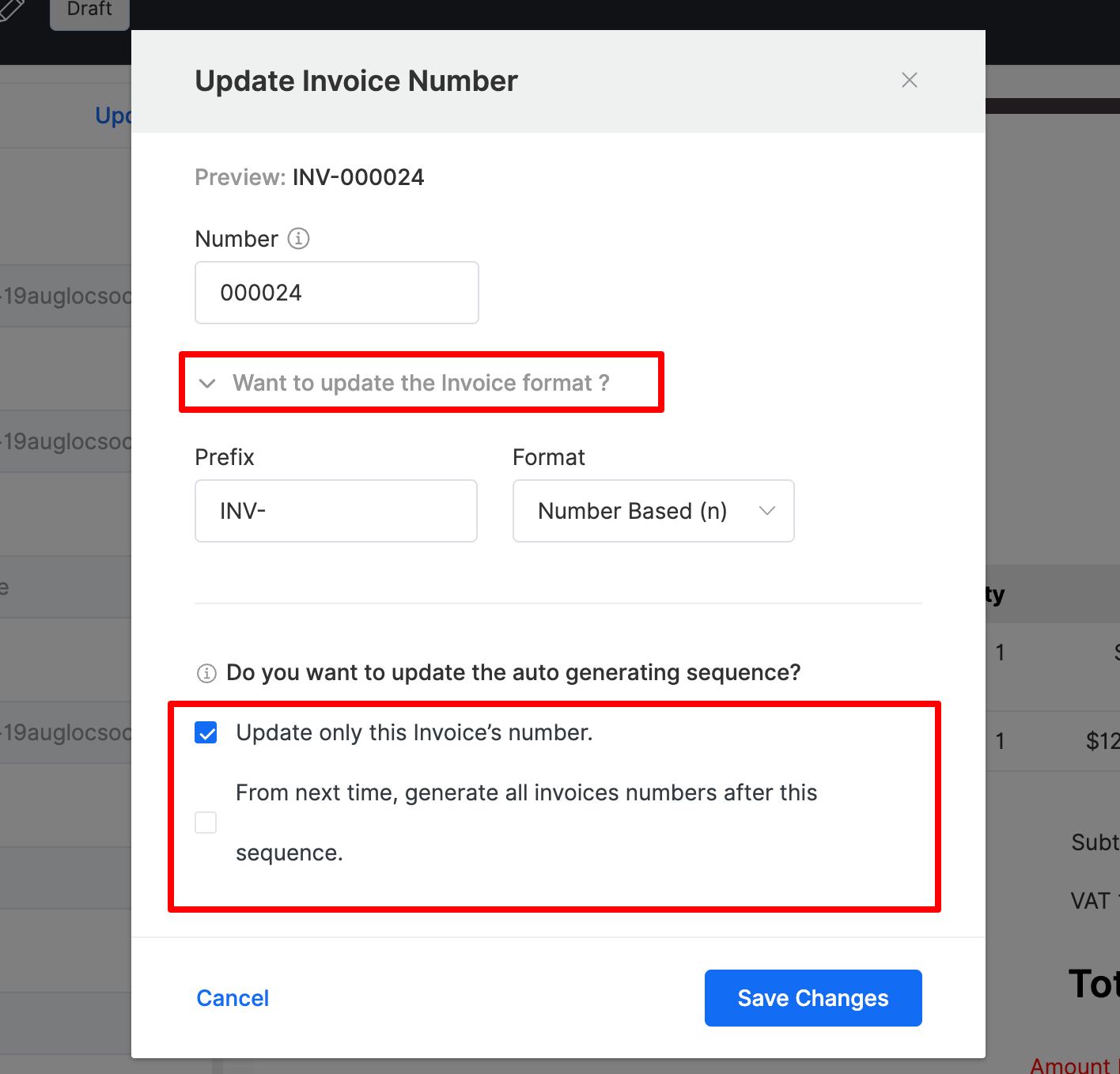
Once you’re in the editor, it’s time to make sure the “paperwork” looks legit. The system automatically generates an invoice number, but you can change the format.
Source: Synup
Pro Tip: If your agency uses a specific prefix like INV-JOE-001, set that up now. Along with that, if you’re in the States and billing a Canadian shop, make sure the currency is set right. If you accidentally bill $500 CAD instead of $500 USD, you lose about $130 due to the exchange rate.
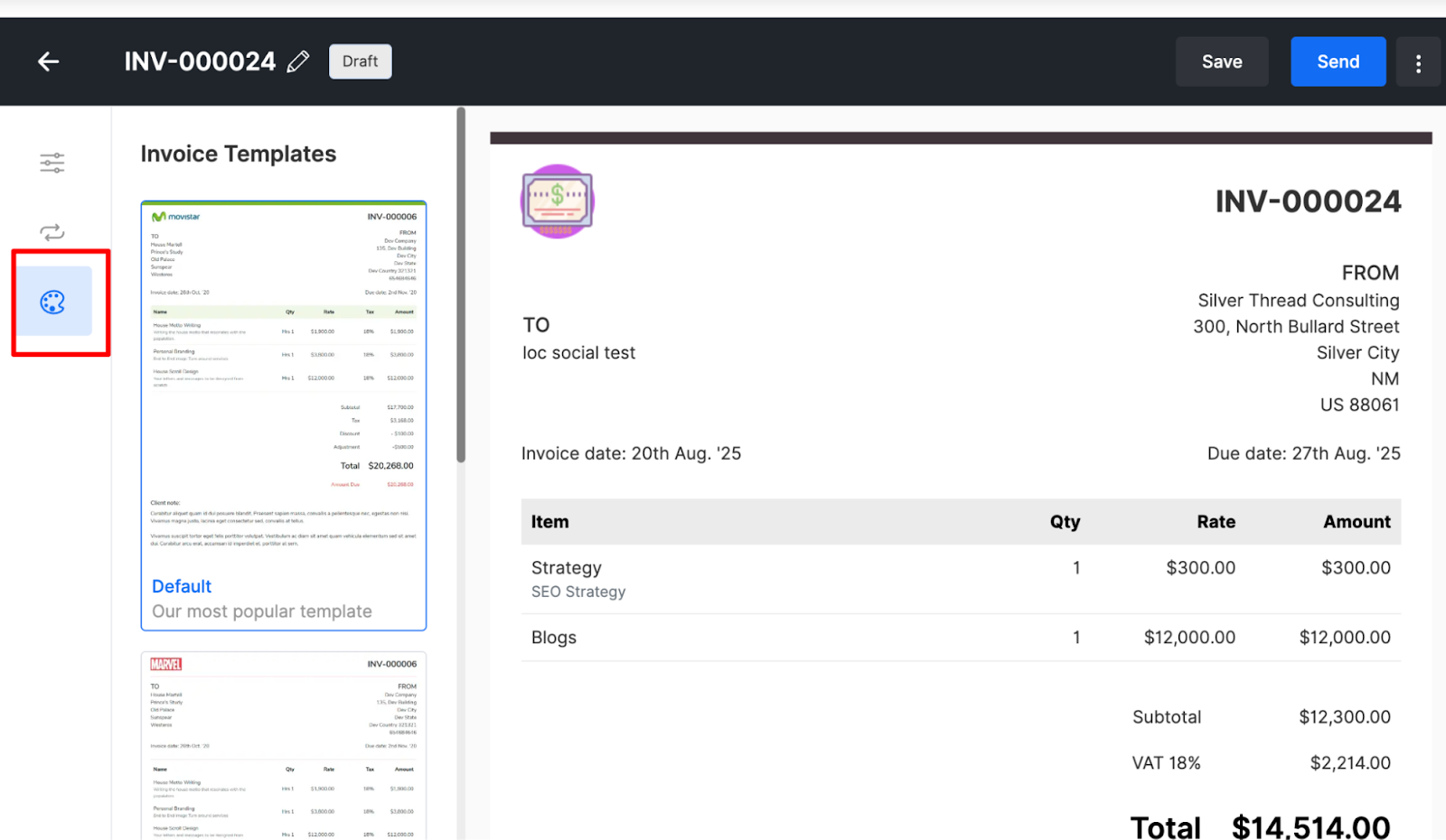
You should also hit the Templates section. Pick a layout that looks good and matches your brand colors.
Source: Synup
First impressions matter, even on a bill. You can also set up an auto-generated invoice number sequence for better tracking.
Step 5: Stack Your Line Items
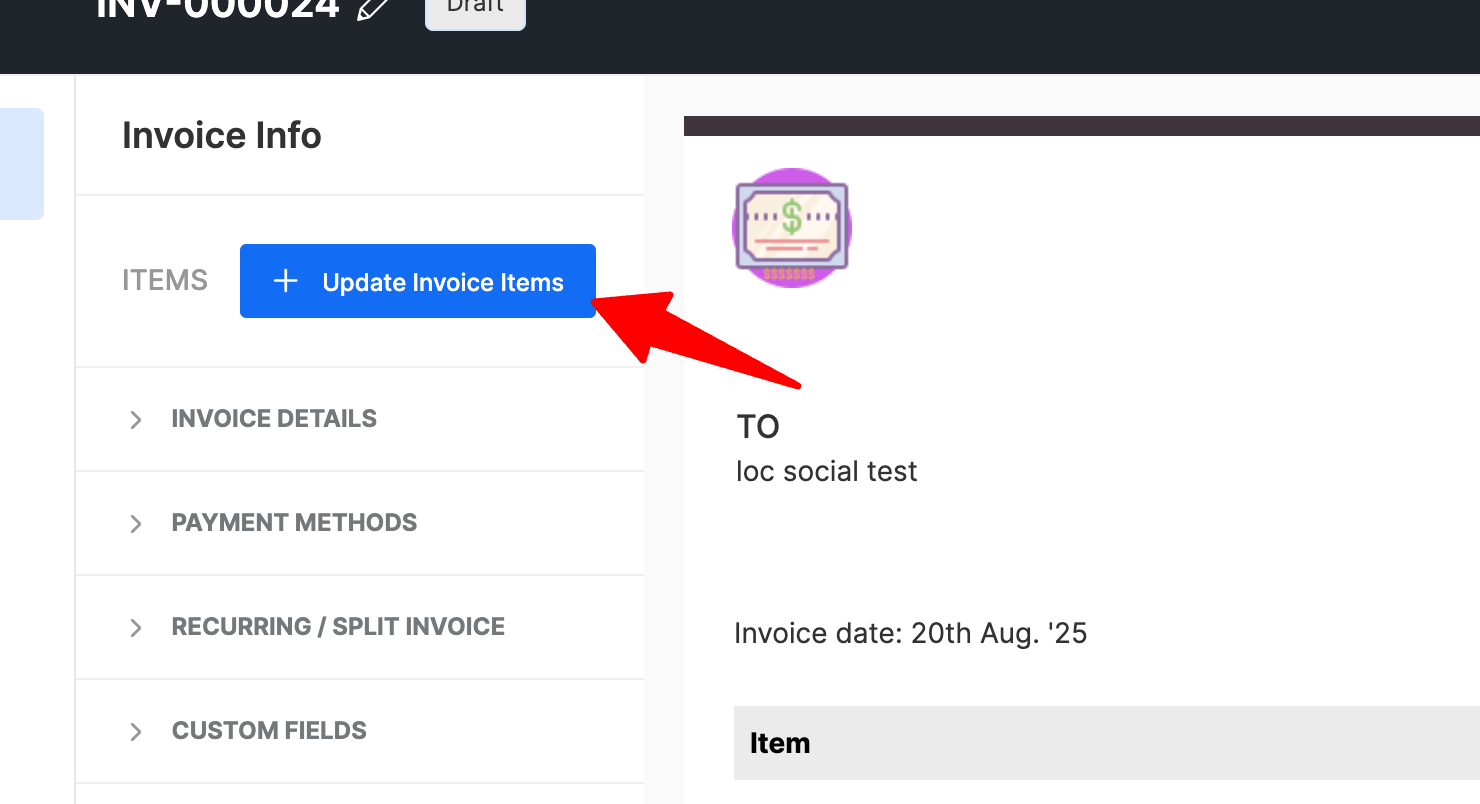
This is where you show the client exactly what they’re paying for. Click + Update Invoice Items.
Source: Synup
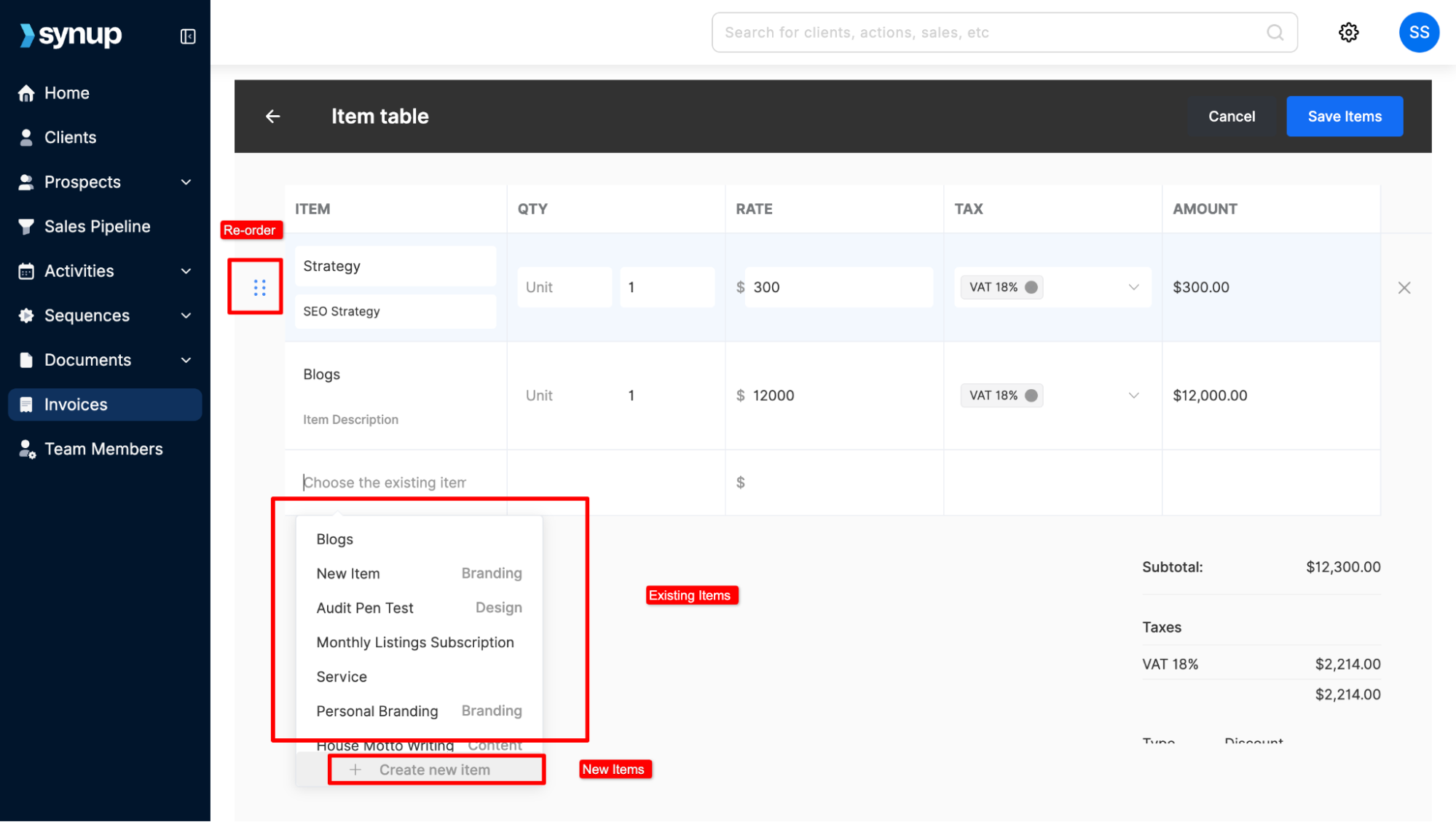
You’ve got two ways to do this:
- The Library Way: If you’re selling a standard $500/mo SEO package, just pull it from your pre-saved library. It saves a ton of typing.
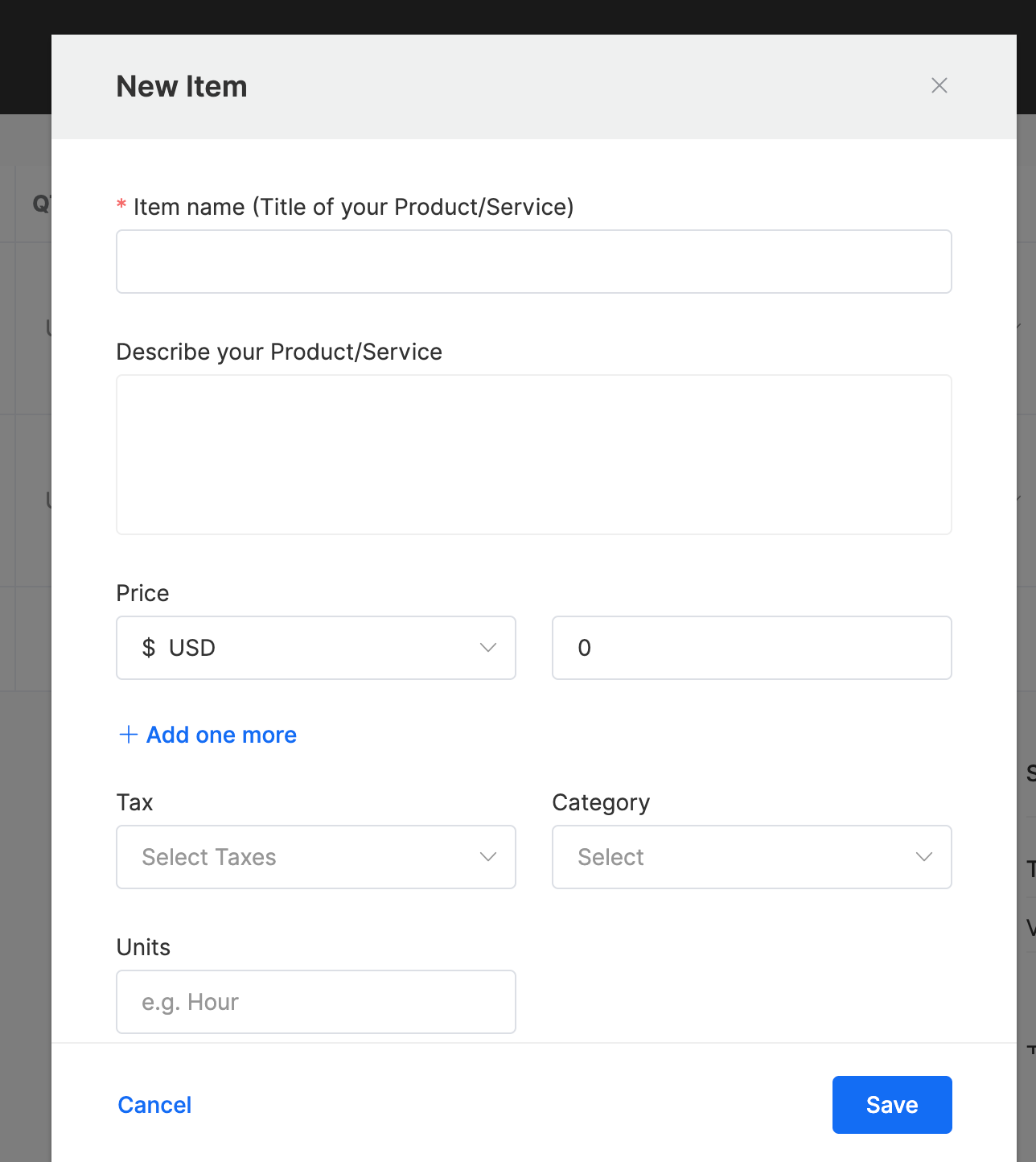
- The Custom Way: Need to add a one-time setup fee or a specific “Holiday Promo” discount? Create it right here.
Another thing to keep in mind: You can actually drag and drop these items to re-order them. Put the big-ticket items at the top so the value is front and center. Plus, this is where you can toggle on those taxes so Uncle Sam doesn’t come knocking later.
Step 6: Lock in the Payment Gateway
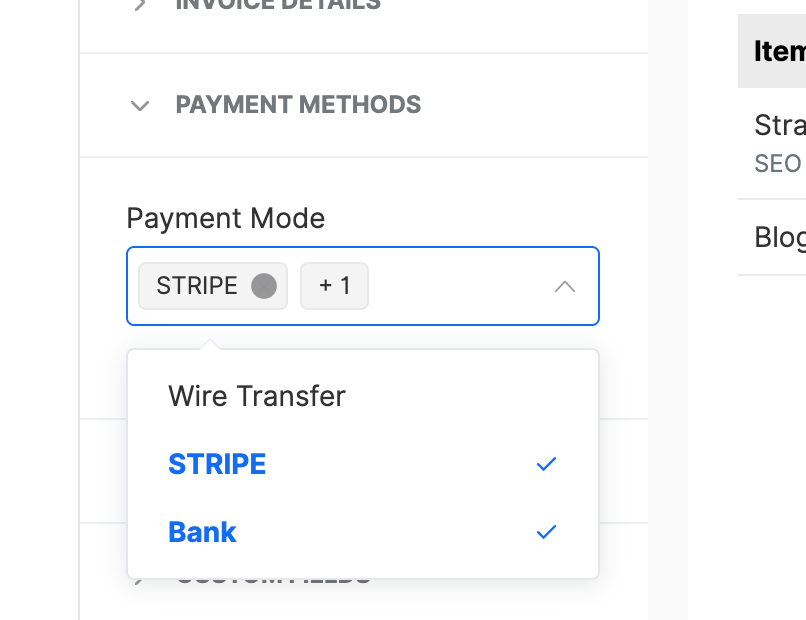
You want to make it dead easy for them to pay you. Go to the Payment Methods tab. If you’ve linked Stripe or another gateway in your settings, toggle on Credit Card and ACH.
Source: Synup
On top of that, ACH is a total lifesaver for larger retainers because the fees are usually way lower than credit card swipes. It’s basically a “keep more of your money” button.
Step 7: Set the “Recurring” Engine to Autopilot
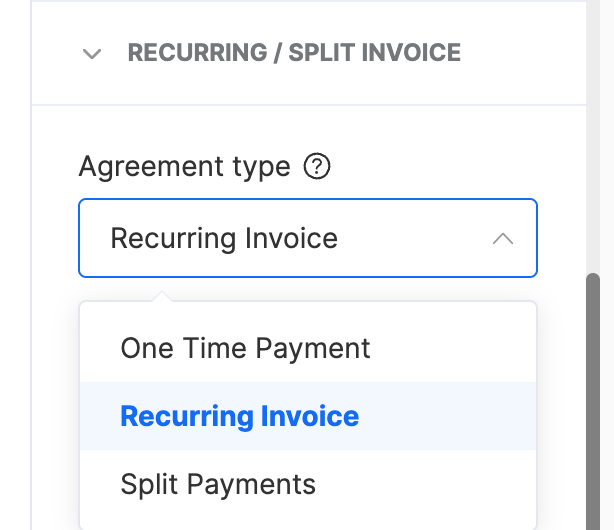
This is the most important part of the whole setup. Look for the Recurring toggle. This is where you decide how the “loop” works:
Source: Synup
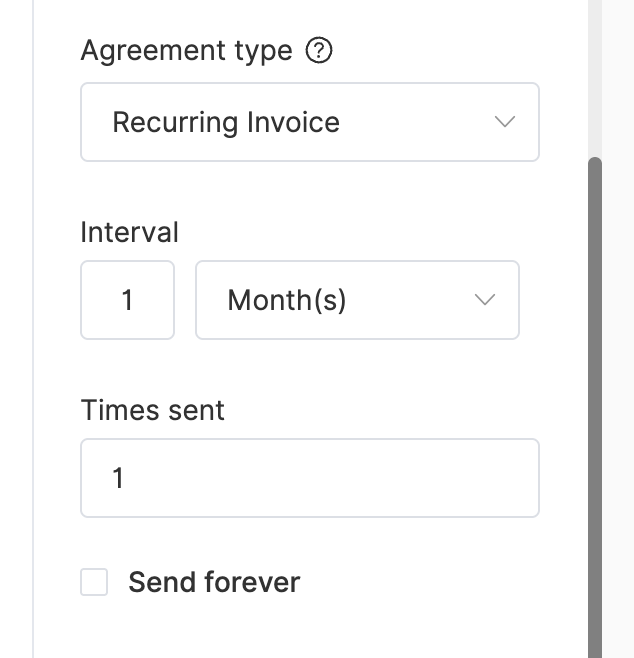
- The Frequency: Most agencies stick to “Monthly,” but if you’re doing a quick 4-week sprint, “Weekly” works too.
- Occurrences: If Joe signed a 6-month contract, set it to 6. But if they’re with you until the wheels fall off, set it to “Forever.”
Source: Synup
The Safety Net: Don’t worry about “Bill Forever” sounding scary. You can pause the sequence at any time if they decide to take a break or pivot their strategy.
Step 8: Add Your Terms and Notes
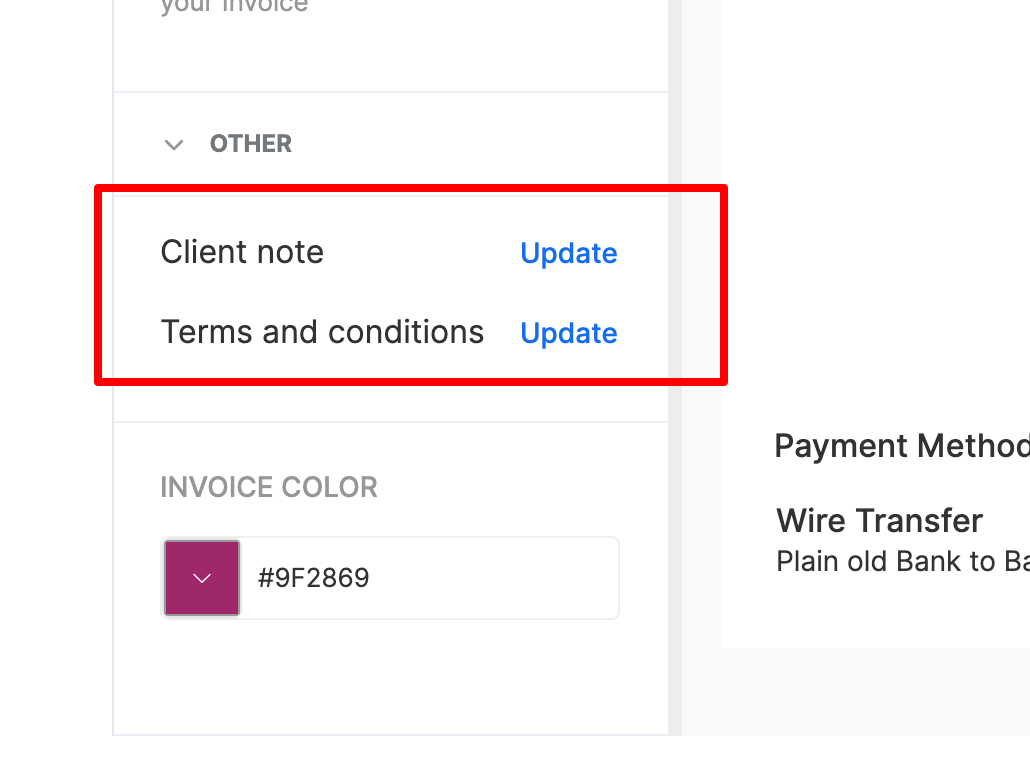
Don’t just send a cold bill; add some context. Scroll down to the Other section in the invoice editor. This is where you can add a “Client Note.”
Source: Synup
Instead of a boring “Thank you,” try something like: “Great month, Joe! We saw a 15% jump in your local map views. Can’t wait to keep the momentum going.”
Besides making you look good, you should also define your Payment Terms here (like “Late fees apply after 25 days.”). It’s equally important to be clear here. If they know a 5% penalty kicks in after day 30, they’re much more likely to prioritize your invoice.
Also Read: How to Create a Marketing Agency Rate Card
Step 9: Check and Send Once
Remember to hit that Save button when you’re done. The OS does not currently auto-save as you set up an invoicing system.
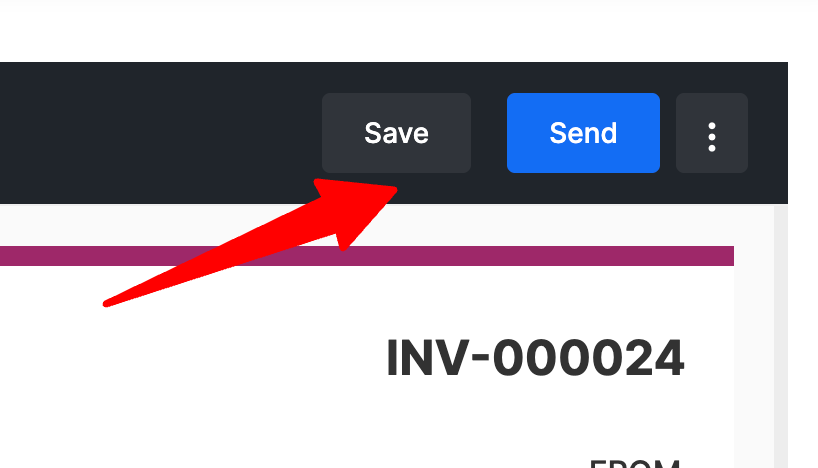
Source: Synup
Before you send your recurring invoice out, click the three dots in the top right corner:
- Preview: Look at it through the client’s eyes. Is the logo blurry? Is the total correct?
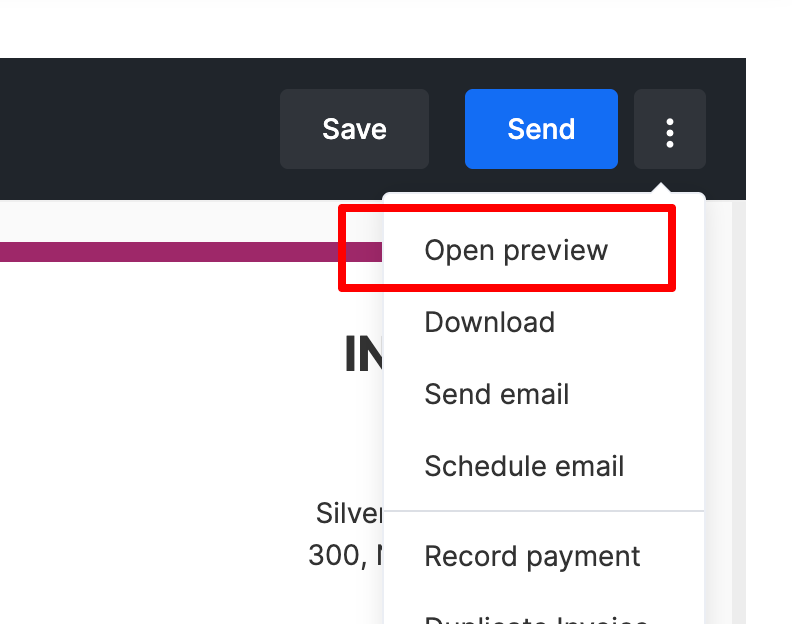
Source: Synup
- Schedule Email: If it’s Friday night but you don’t want the invoice hitting their inbox until Monday morning, use this. It makes you look like you’re hard at work at 9:00 AM sharp.
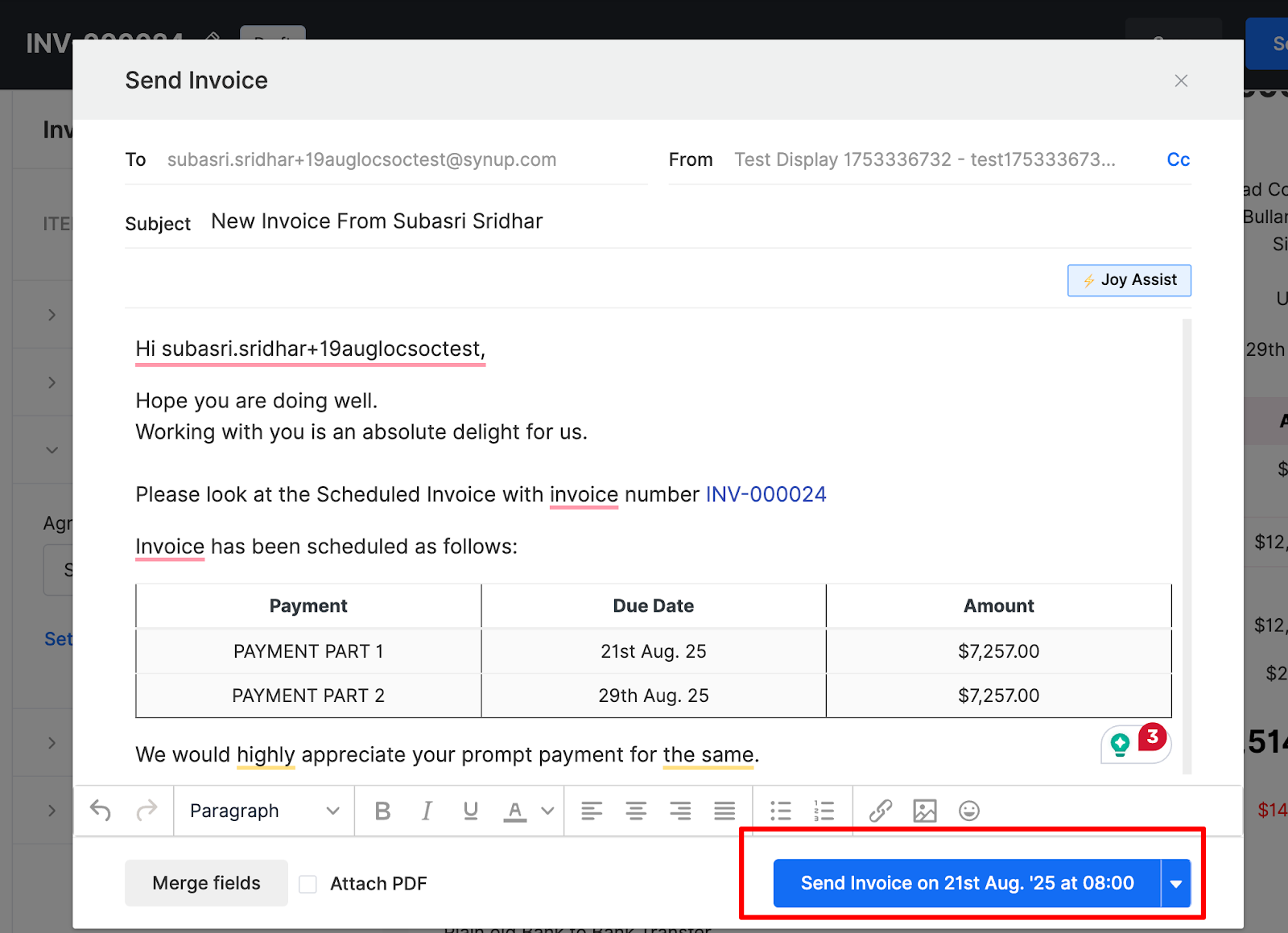
Source: Synup
More Detailed Guide: How to Create an Invoice With Synup
Best Practices for Managing Recurring Billing and Client Relations
Setting up the tech is only half the job done. Here is how to keep things running smoothly.
1. Prioritize Transparency
Nothing kills a client relationship quicker than a “mystery charge.” Your invoice should be simple, clear, and detailed so the client’s finance team doesn’t have to come back with a query. Pay attention to how you name your line items.
Don’t just write “SEO.” Write “Powerful SEO Solutions – [Location Name] – Monthly Maintenance.” This prevents the client from calling you in six months, asking what they are paying for (you’ll probably forget by then too).
2. Review Regularly
Automation is not a “set it and forget it” license to be lazy. Even though it’s automated, review the scheduled invoices monthly to update pricing, service line items, or tax rates.
Also, check for “zombie clients,” people who have canceled but are still being billed. That is a fast track to a chargeback and a bad review.
3. Offer Payment Flexibility
Provide multiple, low-friction payment options to make paying easy. ACH is usually better for your margins, but some clients want those credit card points.
However, if you’re charging $150 per location and have 12 locations, that 3% credit card fee adds up to $54 a month, or $648 a year.
You could consider passing those fees on to the client, but tread carefully there; it can sometimes feel cheap to a high-value partner.
4. Handle Changes Gracefully
Business happens. Sometimes a client needs to pause a location because of a fire, a renovation, or a seasonal dip. Use software like the Synup invoicing tool, as we have seen, which allows easy changes such as pausing payments, adjusting billing information, or upgrading service tiers.
Plus, make sure your contract covers how pro-rated months work so there are no surprises when they add their 5th location on the 20th of the month.
Conclusion
Recurring invoices are primarily a billing convenience, but you’ll soon find them to be a bonafide operational upgrade. For agencies working on retainers, per-location pricing, or long-term service contracts, manual invoicing quietly drains time, focus, and cash flow. Every delayed payment creates unnecessary pressure on payroll, delivery, and growth decisions.
When recurring invoices and payments are set up correctly, billing stops being a monthly task and becomes a background system. Revenue lands on schedule. Forecasting becomes reliable. Account managers stop acting like collections agents. Clients stop questioning the value every 30 days because the charge becomes expected, planned, and budgeted.
Start small if needed. Move your most predictable retainer clients to recurring invoices first. Once you experience consistent payments without follow-ups, it becomes clear why high-growth agencies never go back to manual billing. Start your client recurring invoicing with a Synup demo.
FAQs: Recurring Invoices Explained
-
What is an example of a recurring invoice?
A simple example is a digital marketing agency charging a client $1,200 every month for SEO and listings management across three locations. The invoice is automatically generated and sent on the 1st of every month with the same services and pricing listed. The client receives it, reviews it, and completes payment using their preferred method. If there are any pricing or scope changes, the invoice can be adjusted before the next cycle.
-
How do I send invoices to clients?
You can send invoices by using invoicing software that stores client details, services, and payment terms in one place. You can create an invoice with Synup, email it directly to the client, include a secure payment link, and track whether it’s viewed or paid. For recurring invoices, the system automatically sends the invoice on a fixed schedule without manual work each month.
-
What are the types of recurring transactions?
There are three common types of recurring invoices that agencies use:
- Recurring invoices: An invoice is sent automatically, but the client manually approves and pays each cycle.
- Recurring payments (auto-pay): The invoice is generated, and payment is charged automatically to a saved payment method.
- Subscription billing: Fixed services at a fixed price are billed on a consistent schedule (monthly, quarterly, or annually), typically sold as a bundled package with little or no variation between billing cycles.