

Most businesses treat their Google Business Profile like a one-time form to fill out. Enter your name, address, and hours. Then, click save, and you’re done. But there’s a layer sitting just beneath those basics that determines whether the right customers even see you at all: Google Business Profile attributes (previously called Google My Business attributes).
A profile without filled-in attributes is incomplete and invisible to a meaningful slice of searches. Someone looking for a “wheelchair-accessible coffee shop near me” or an “LGBTQ+ friendly salon” isn’t going to find a business whose attributes weren’t set up. Google can’t surface what it doesn’t know.
So, let’s understand what GBP attributes are, why they matter, and how to add and maintain them as part of an ongoing optimization workflow.
TL;DR
- GBP attributes determine which searches your business is eligible for.
- Missing attributes means you won’t appear in filtered searches.
- There are two types: factual (you control) and subjective (Google generates).
- They influence Local Pack visibility, clicks, and profile completeness.
- Review and update attributes regularly as part of GBP optimization.
What Are Google Business Profile Attributes?
GBP attributes are structured labels that describe specific features, amenities, services, or identity characteristics of a business. They appear across Google Search, Google Maps, and the Local Pack, sometimes as small chips or highlight snippets directly beneath a listing in search results.
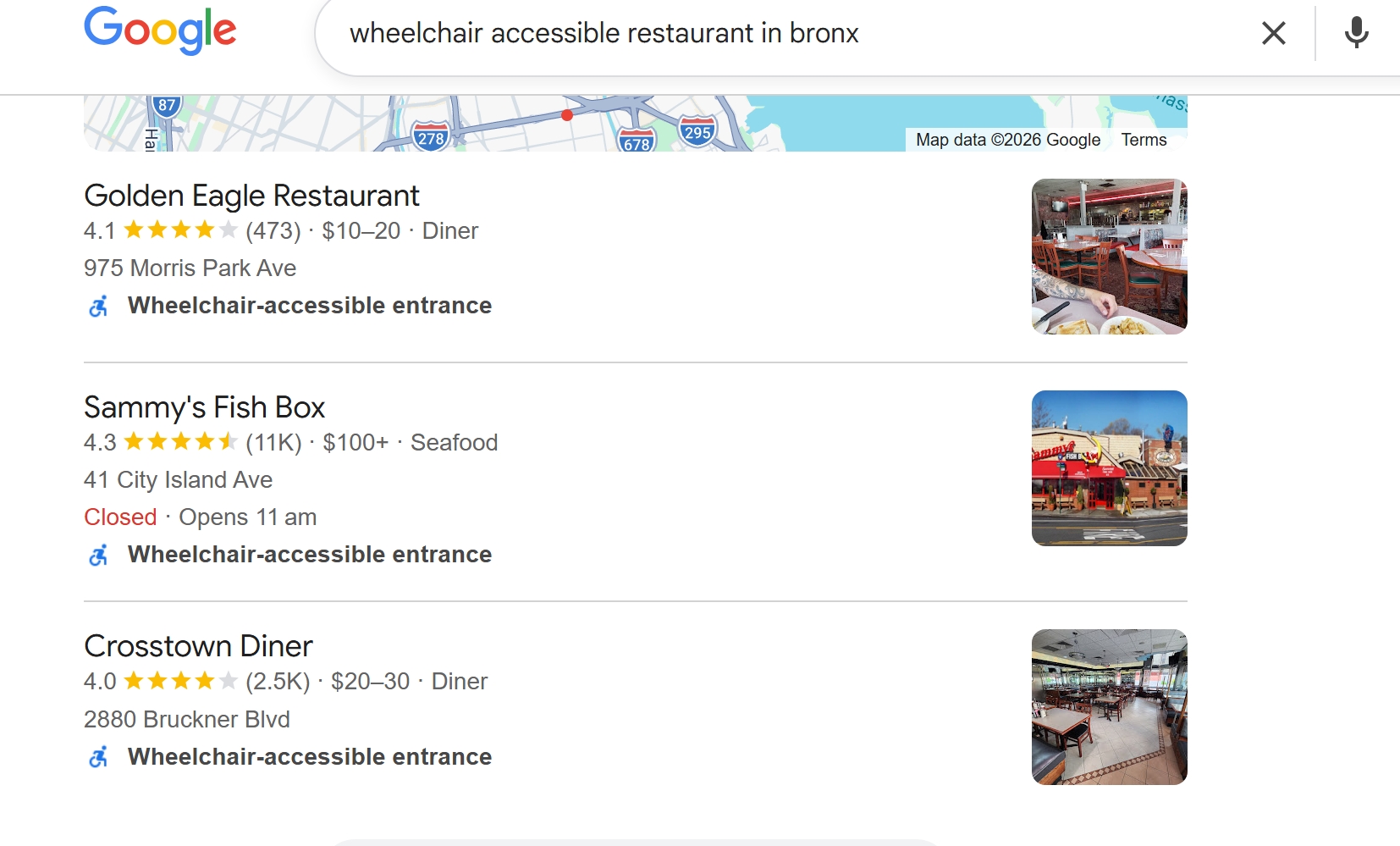

There are two distinct types of attributes, and this distinction matters a great deal:
- Factual (objective) attributes: These are set directly by the business owner or manager. These are binary choices: you either have wheelchair-accessible parking or you don’t. Examples include outdoor seating, online appointments, curbside pickup, and women-led. You control these, and they update on your profile relatively quickly once saved.
- Subjective attributes (also called “highlights”): These are surfaced by Google based on user reviews, third-party sources, and local mentions. Examples include labels like “Great atmosphere,” “Lively,” “On critic’s lists.” You cannot add or remove these directly. They’re Google’s interpretation of what customers consistently say about your business.
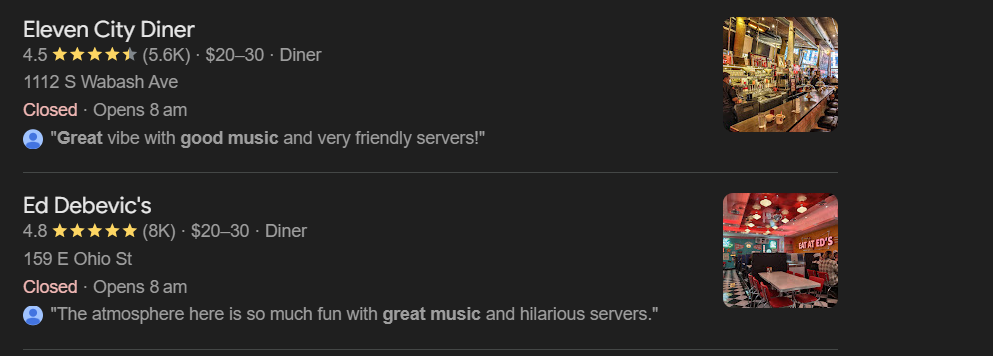

Here’s what you should know upfront: the attributes available to a business depend entirely on its primary business category. A hotel sees very different attribute options than a dental practice or a law firm. If expected attributes aren’t showing up in your profile editor, the first thing to check is whether the primary category is set correctly.
What are the Types of GBP Attributes?
Attributes are organized into groups. Here’s a practical overview of the main categories, representative options within each, and the business types that typically use them.
Accessibility
This is available to most businesses with a physical location. Options include wheelchair-accessible entrance, wheelchair-accessible restroom, wheelchair-accessible parking, wheelchair-accessible seating, assistive hearing loop, and Auracast broadcaster support (these last two are newer additions for hearing assistance).
Crowd & Identity
Available to most businesses, these include LGBTQ+-friendly, family-friendly, women-led, Black-owned, veteran-led, Latino-owned, and more. These attributes matter both for discoverability in filtered searches and as signals to customers about the values and ownership of a business.
Service Options
Available to most service and retail businesses. Options typically include online appointments, onsite services, online estimates, in-store pickup, curbside pickup, and delivery. These are high-utility for search matching. Someone filtering for businesses offering “curbside pickup” will only see listings with that attribute enabled.
Planning
Availability varies by category. Includes: accepts reservations, appointment required, accepts new patients, and reservations recommended. Particularly important for healthcare, personal services, and hospitality.
Dining Options
Available to restaurants and food service businesses. Options include dine-in, takeout, outdoor seating, drive-through, no-contact delivery, and alcohol service options. For multi-location restaurant clients, these are often the highest-traffic attributes for customer filtering behavior.
Amenities
Availability varies by category. Common options include free Wi-Fi, gender-neutral restrooms, pets allowed, and parking availability (free or paid). These are the attributes customers check when deciding whether a location fits their particular visit, especially for hospitality and retail.
Language Assistance
Added in 2023, this category allows businesses to indicate which languages staff can assist customers in. There are 19 language options available, which is a meaningful addition for businesses serving multilingual communities, and still underused by most profiles.
Highlights/Subjective
Not directly editable. These appear as user-surfaced labels like “Great dessert,” “Friendly staff,” or “On critic’s lists,” drawn from review content and third-party mentions. More on managing these in the section below.
One important note: Not every category will be visible to every business. The attributes available to your profile are gated by your primary business category. Setting the wrong primary category affects your rankings as well as limits which attributes you can access.
Why GBP Attributes Matter for Local Search
Attributes sure look helpful, but here’s how they aid you specifically. Understanding the mechanism helps you prioritize properly.
Attributes do three separate things for local search performance.
- First, they determine query eligibility. When someone searches for an “LGBTQ+ friendly hair salon near me” or a “coffee shop with outdoor seating,” Google filters results against attribute data before ranking them. A business without the relevant attribute set is excluded entirely for that search.
- Second, they appear as Local Pack chips and local justifications. In search results, attribute chips (“Wheelchair accessible,” “Women-led,” “Outdoor seating”) appear directly beneath a listing and influence click-through decisions before a user even opens the full profile. Local justifications (those short contextual snippets in the Local Pack) can be pulled from attribute data and have a documented impact on click-through rate.
- Third, completeness is itself a ranking signal. According to Google’s own guidance, complete profiles are more likely to surface in relevant searches. Attributes are part of what “complete” means.
Together, they are structural advantages in how Google evaluates and displays your listing.
How to Add Attributes to Your Google Business Profile
Adding factual attributes is straightforward. Here’s the exact process:
- Sign in at business.google.com, or search for your business name in Google Search while logged into the managing Google account.
- Click “Edit profile” on your listing.
- Navigate to the “More” tab within the profile editor.
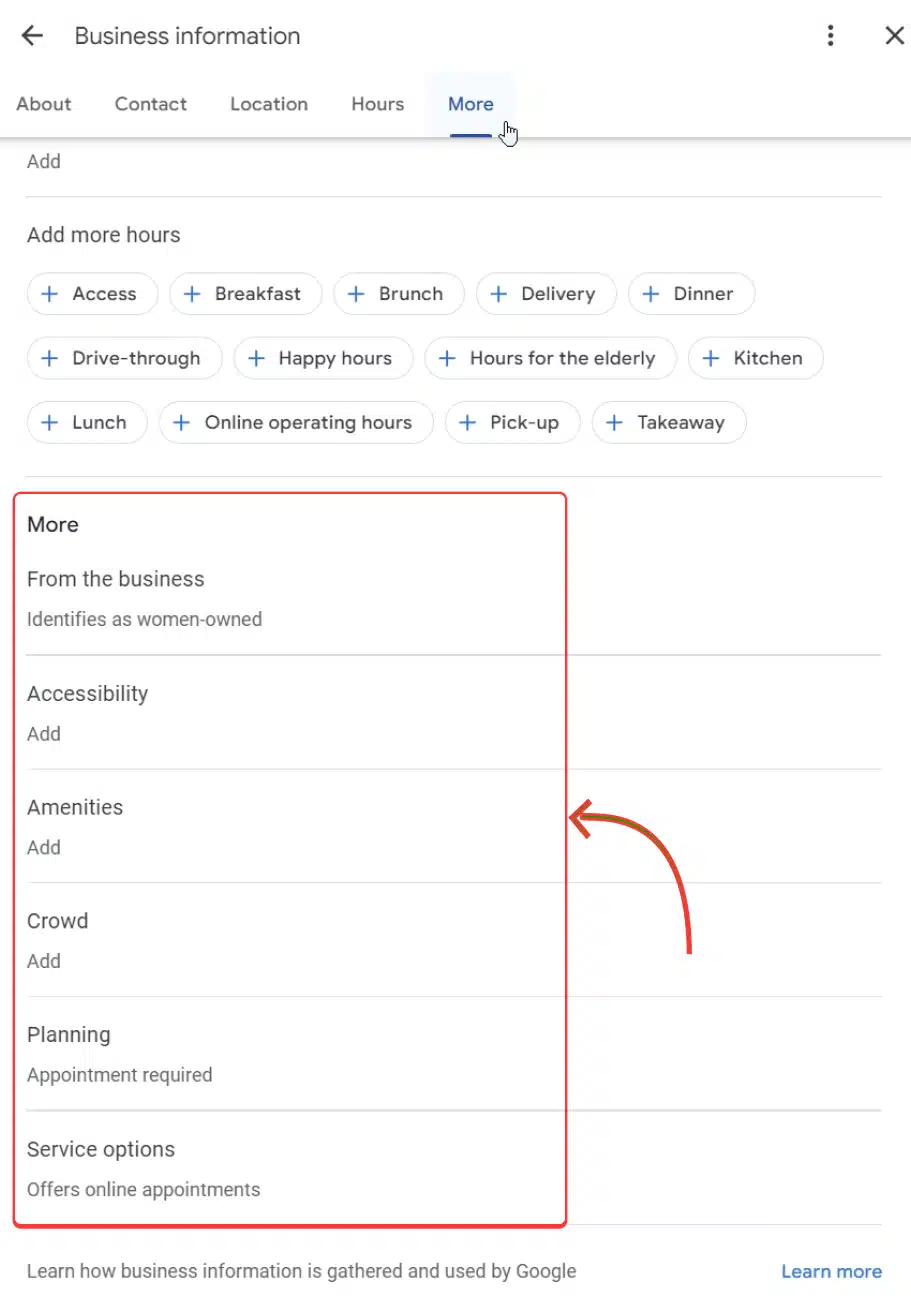

Source: EmbedSocial
- Review the attribute categories available for your business type and toggle on everything that accurately applies.
- Click “Save.” Attribute changes typically surface in Google Search and Maps within a few hours, though it can occasionally take a few days.
A few important caveats:
- Remember that you can only set factual attributes through this interface. Subjective highlights cannot be manually added or removed; they’re generated by Google.
- If you’re not seeing expected attribute options, verify that your primary business category is set correctly first.
Read: How to Add Google My Business Categories List
- For agencies managing multiple client locations, logging into each profile individually doesn’t scale. Tools like Synup’s listing management platform let you review attribute completeness across all client profiles from a single dashboard without the account-by-account tedium that breaks most agency workflows at volume. Explore top GBP management tools to find the right fit for your team.
Managing Subjective Attributes and Profile Highlights
Here’s the part most SEO guides don’t address well: what do you actually do about the attributes you can’t control?
You can’t add subjective attributes yourself, but you’re not entirely passive either.
The mechanism works like this: when a sufficient number of reviews consistently mention a specific quality, Google begins to treat that quality as a reliable signal and surfaces it as a highlighted attribute. High review volume mentioning particular terms (speed of service, a specific dish, the physical environment) increases the probability of that quality appearing on the profile.
This means that review strategy and attribute strategy are connected. Encouraging detailed, specific reviews (not just star ratings) gives Google more signal to work with.
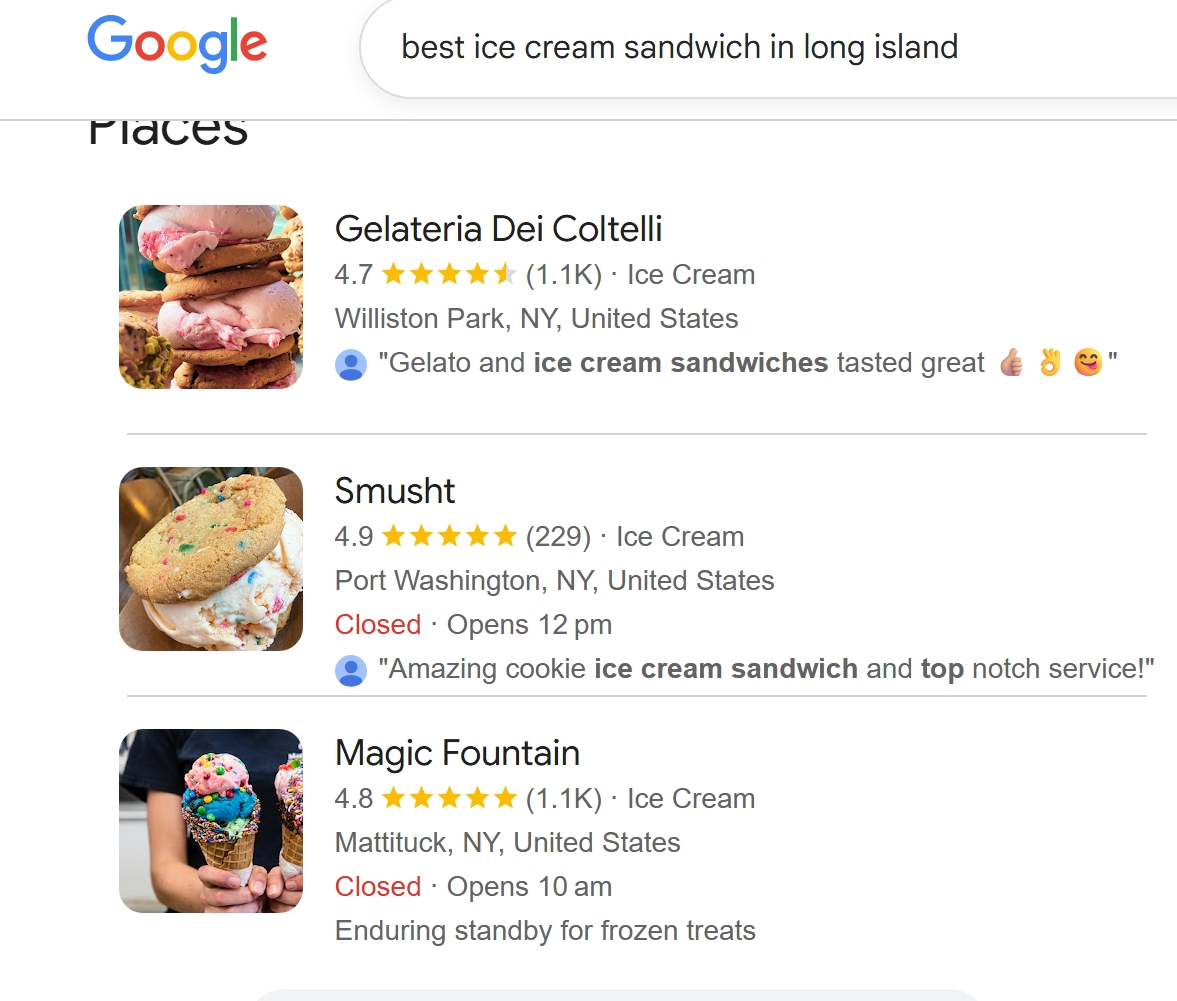

One operational gap agencies often miss is checking which highlights are currently showing on each client profile. These can be inaccurate, outdated, or even unhelpful. If a highlight that no longer reflects the business is showing up, the most effective response is to generate a new wave of accurate, detailed reviews that shift the signal. You can’t remove the highlight directly, but you can dilute the data that’s surfacing it.
Third-party coverage matters too. Being listed on local “best of” lists, regional press, or platforms like Yelp and TripAdvisor contributes to which highlights Google surfaces. This is where citation-building and reputation management feed into attribute outcomes. Another reason these disciplines aren’t as separate as they’re sometimes treated.
Also Read: 5 Ways To Automate Review Management For Your Clients
The Bottom Line
GBP attributes are one of the lowest-effort, highest-signal optimizations available for any local business listing. They determine which searches a business is eligible to appear in, influence how listings look in the Local Pack, and contribute directly to profile completeness (one of Google’s stated ranking inputs).
The businesses and agencies that treat them as a one-time setup are routinely leaving visibility on the table. New attribute categories get added, old ones become outdated, and the subjective highlights surfacing on a profile may not reflect what a business actually wants customers to see.
If you’re building out a complete GBP optimization workflow (beyond just attributes), Synup’s Google Business Profile optimization guide covers the full picture. For agencies managing listings at scale, Synup’s listing management software makes it easier to maintain consistent attribute completeness across all client locations without the manual overhead.
FAQs
- Do GBP attributes impact visibility or just conversions?
Both. GBP attributes control whether you appear in filtered searches and influence clicks through attribute chips.
- Which GBP attributes matter the most?
GBP attributes that are tied to active search filters, such as accessibility, service options, and dining features, have the greatest impact.
- How long do GBP attribute changes take to show?
Changes to your GBP attributes usually show up within a few hours, but it can take up to a few days.


